Mastering Enterprise AI: A Deep Dive into Vertex AI Agent Builder’s Governance and Observability
The landscape of artificial intelligence is shifting rapidly from experimental model training to the deployment of sophisticated, autonomous agents. While the industry has spent years obsessing over model architectures—dominated by headlines in TensorFlow News and PyTorch News—the current frontier is orchestration, governance, and observability. Recent developments in the Google Cloud ecosystem, specifically regarding Vertex AI News, highlight a critical pivot toward making generative AI enterprise-ready. The focus is no longer just on how smart a model is, but on how controllable, visible, and reliable it acts within a business context.
As organizations rush to integrate Large Language Models (LLMs) into their workflows, the “black box” nature of these systems has become a primary blocker. Updates to Vertex AI Agent Builder address these concerns head-on by introducing robust governance tools and comprehensive observability dashboards. This article explores how developers can leverage these new capabilities to build agents that are not only intelligent but also compliant and debuggable. We will contrast these native solutions with open-source alternatives found in LangChain News and LlamaIndex News, and provide practical code examples to get you started with governed agentic workflows.
Section 1: The Shift to Agentic Workflows and Reasoning Engines
The concept of an “agent” differs significantly from a standard chatbot. While a chatbot answers questions based on training data, an agent reasons, plans, and executes actions using external tools. This shift is evident across the industry, from OpenAI News regarding function calling to Anthropic News regarding Claude’s tool-use capabilities. Vertex AI Agent Builder encapsulates this by providing a managed service for “Reasoning Engines.”
A Reasoning Engine in Vertex AI allows developers to define a set of tools (APIs, Python functions) and a goal. The LLM then determines the sequence of steps required to achieve that goal. However, without strict definitions, agents can hallucinate tool parameters or loop indefinitely. This is where the new governance features come into play, offering a layer of control similar to what one might look for in AWS SageMaker News or Azure Machine Learning News updates.
To build a robust agent, you first need to initialize the Vertex AI SDK and define your tools. Unlike the lower-level abstractions often discussed in Keras News or JAX News, Vertex AI operates at the application layer.
Practical Example: Defining a Tool-Enabled Agent
Below is an example of how to set up a basic agent using the Vertex AI SDK for Python. This agent is equipped with a custom tool to fetch data, a precursor to adding governance layers.
import vertexai
from vertexai.preview import reasoning_engines

# Initialize Vertex AI
vertexai.init(project="your-project-id", location="us-central1")

# Define a custom tool (Python function)
def get_customer_status(customer_id: str) -> dict:
    """Retrieves the current status and tier of a customer based on ID.

    Args:
        customer_id: The unique identifier for the customer (e.g., CUST-123).
    """
    # Mock database lookup
    mock_db = {
        "CUST-123": {"status": "Active", "tier": "Platinum"},
        "CUST-456": {"status": "Pending", "tier": "Gold"}
    }
    return mock_db.get(customer_id, {"status": "Unknown", "tier": "None"})

# Define the agent class
class CustomerSupportAgent:
    def __init__(self, model: str = "gemini-1.5-pro"):
        self.model_name = model

    def query(self, question: str):
        # Logic to invoke the model with tools would go here
        # This is a simplified representation of the Reasoning Engine structure
        return f"Processing query: {question}"

# Create the Reasoning Engine
# In a real scenario, this registers the app remotely on Vertex AI
agent = reasoning_engines.ReasoningEngine.create(
    CustomerSupportAgent(),
    requirements=["google-cloud-aiplatform"],
    display_name="Customer Support Agent",
    description="Agent that helps with customer status lookups",
)

print(f"Agent created: {agent.resource_name}")
This code establishes the foundation. However, in a production environment, simply giving an LLM access to a function isn’t enough. You need to ensure the agent doesn’t hallucinate a customer ID or access data it shouldn’t. This leads us to the critical importance of governance.

Section 2: Implementing Governance and Grounding
Governance in GenAI is the set of policies and constraints that ensure your model behaves within acceptable boundaries. Recent Vertex AI News emphasizes “Grounding” as a primary governance mechanism. Grounding connects the model’s generation to verifiable sources of truth, such as your enterprise data in Google Search or a Vector Database. This is a direct counter-measure to the hallucination problems often discussed in Google DeepMind News and Meta AI News.
Vertex AI Agent Builder now allows for granular control over which data sources an agent can access and how strictly it must adhere to them. This is similar to the retrieval-augmented generation (RAG) patterns seen in Haystack News or LlamaIndex News, but it is managed as a platform feature rather than custom code. By enforcing grounding, you ensure that if the information isn’t in your documents, the agent refuses to answer, rather than making up facts.
Code Example: Enforcing Grounding with Enterprise Data
The following example demonstrates how to configure a Gemini model within Vertex AI to use a grounding source. This ensures the model’s responses are cited and derived solely from the provided data store, a technique essential for compliance in sectors like finance and healthcare.
from vertexai.generative_models import GenerativeModel, Tool, grounding

# Define the grounding source (e.g., a Vertex AI Search data store)
# You must have created a Data Store in Vertex AI Agent Builder first
DATA_STORE_ID = "projects/your-project/locations/global/collections/default_collection/dataStores/your-datastore-id"

# Create the grounding tool
grounding_tool = Tool.from_retrieval(
    retrieval=grounding.Retrieval(
        source=grounding.VertexAISearch(datastore=DATA_STORE_ID),
        disable_attribution=False  # We want citations for governance
    )
)

# Initialize the model with the grounding tool
model = GenerativeModel("gemini-1.5-pro-001")

# Generate a response with governance applied
response = model.generate_content(
    "What is our refund policy for digital products?",
    tools=[grounding_tool],
    generation_config={
        "temperature": 0.0  # Low temperature for factual consistency
    }
)

# Parse the response to check for grounding metadata
if response.candidates[0].content.parts:
    print("Response:", response.text)

    # Check for grounding attributions (citations)
    grounding_metadata = response.candidates[0].grounding_metadata
    if grounding_metadata.grounding_chunks:
        print("\nSources used:")
        for chunk in grounding_metadata.grounding_chunks:
            print(f"- {chunk.retrieved_context.title}")
    else:
        print("\nWarning: Response was not grounded in enterprise data.")
This implementation highlights the difference between a standard LLM call and a governed one. The grounding_metadata object is crucial for audit logs. If an agent provides financial advice, you need the trace proving exactly which document paragraph led to that advice. This level of detail is what separates enterprise tools from experimental scripts found in Hugging Face News or Colab News.
Section 3: Observability and Tracing in Production
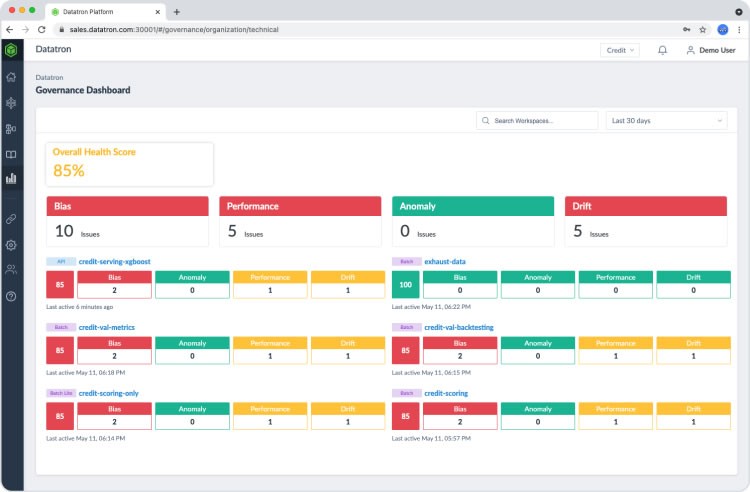
Once an agent is governed, it must be observed. Observability goes beyond simple logging; it involves tracing the chain of thought, measuring latency per step, and analyzing token usage. The new updates to Vertex AI Agent Builder include observability dashboards that rival specialized tools mentioned in LangSmith News, Weights & Biases News, or MLflow News.
In a complex agentic workflow, an agent might search a database, analyze the results, call a calculator tool, and then format the answer. If the response is slow, you need to know which step caused the bottleneck. Is the Vector Search (powered by tech like Pinecone News or Milvus News) slow? Is the LLM inference lagging? Or is the reasoning logic flawed?
Vertex AI now integrates deeply with Google Cloud Logging and Monitoring, but for Python developers, integrating custom telemetry is vital for debugging logic errors.
Code Example: Custom Telemetry for Agent Steps
While Vertex AI handles infrastructure logging automatically, application-level logging helps debug the “mind” of the agent. Here is how you might wrap agent execution with OpenTelemetry-style tracing, a practice becoming standard in DataRobot News and Snowflake Cortex News discussions.
import time
import logging
from typing import Any, Callable

# Configure structured logging
logging.basicConfig(level=logging.INFO, format='%(asctime)s - %(levelname)s - %(message)s')
logger = logging.getLogger("vertex_agent_tracer")

def trace_step(step_name: str) -> Callable:
    """Decorator to trace execution time and inputs/outputs of agent steps."""
    def decorator(func: Callable) -> Callable:
        def wrapper(*args, **kwargs):
            start_time = time.time()
            logger.info(f"START: {step_name} | Inputs: {args} {kwargs}")

            try:
                result = func(*args, **kwargs)
                duration = time.time() - start_time
                logger.info(f"SUCCESS: {step_name} | Duration: {duration:.4f}s | Output: {str(result)[:100]}...")
                return result
            except Exception as e:
                duration = time.time() - start_time
                logger.error(f"FAILURE: {step_name} | Duration: {duration:.4f}s | Error: {e}")
                raise e
        return wrapper
    return decorator

# Applying the tracer to agent components
class ObservableAgent:

    @trace_step("retrieve_context")
    def retrieve_context(self, query: str):
        # Simulate retrieval latency (e.g., from Weaviate or Chroma)
        time.sleep(0.5)
        return "Retrieved context about " + query

    @trace_step("generate_answer")
    def generate_answer(self, context: str):
        # Simulate LLM generation latency
        time.sleep(1.2)
        return f"Generated answer based on: {context}"

    @trace_step("agent_workflow")
    def run(self, user_query: str):
        context = self.retrieve_context(user_query)
        answer = self.generate_answer(context)
        return answer

# Run the observable agent
agent = ObservableAgent()
final_response = agent.run("Project Alpha details")
This code snippet manually implements what the new Vertex AI observability dashboard visualizes automatically. By correlating these logs with the platform’s metrics, developers can optimize costs (a hot topic in OpenAI News and Cohere News) and performance.
Section 4: Best Practices and the AI Ecosystem
Integrating these new Vertex AI features requires a holistic view of the AI ecosystem. You aren’t just building in a vacuum; you are likely utilizing libraries from Hugging Face Transformers News or vector stores discussed in Qdrant News and Weaviate News. Here are key best practices for modern agent deployment:
1. Hybrid Retrieval Strategies
Don’t rely solely on the built-in search. Combine Vertex AI’s grounding with specialized vector databases. If you are following Pinecone News, you know that hybrid search (keyword + semantic) yields better results. Use Vertex AI to govern the final answer, but use optimized indices for the raw retrieval.
2. Evaluation is Continuous
Observability is passive; evaluation is active. Use frameworks referenced in DeepSpeed News or AutoML News to run regression tests on your agents. When you update the prompt or the underlying model (e.g., moving from Gemini 1.0 to 1.5), use the governance tools to ensure the safety scores haven’t dropped.
3. Model Garden and Flexibility
Vertex AI’s Model Garden includes models from Mistral AI News, Meta AI News (Llama 3), and others. While Google’s models are tightly integrated with Agent Builder, the governance layer is increasingly supporting third-party models. This prevents vendor lock-in, a concern often cited in Amazon Bedrock News. Always design your agent code to be model-agnostic where possible.
4. Local vs. Cloud Development
Tools like Ollama News and LocalAI have made local development popular. However, the governance features discussed here are cloud-native. A best practice is to use tools like LiteLLM or LangChain to abstract the provider, developing locally with small models and deploying to Vertex AI for the heavy lifting and compliance checks.
Conclusion
The latest updates to Vertex AI News signal a maturing market. The excitement of “magic” chatbots is being replaced by the engineering rigor of governance, observability, and reliability. For developers, this means the skillset is expanding. It is no longer enough to know how to prompt an LLM; one must now know how to ground it, trace it, and prove its safety to stakeholders.
While competitors like OpenAI and AWS continue to push the boundaries of model capability and infrastructure, Google Cloud’s focus on the application layer—specifically through the Agent Builder—provides a compelling path for enterprises. By leveraging the code patterns and strategies outlined above, you can move beyond prototypes and build AI agents that are ready for the real world. As you integrate these tools, keep an eye on emerging trends in Ray News for scaling and RunPod News for alternative compute, ensuring your architecture remains flexible in this fast-evolving domain.