

Taming the LLM Chaos: My Real-World MLflow Setup
I still remember the exact moment I realized my “custom” MLOps setup was a disaster waiting to happen. It was 2:00 AM on a Tuesday, and I was trying to rollback a production model that had started hallucinating wildly about user data. The problem wasn’t the model itself—it was that I had no idea which version of the data processing script had generated the artifacts currently running in the container. I had five different Jupyter notebooks named train_vfinal.ipynb, train_vfinal_REAL.ipynb, and train_v2_fixed.ipynb.
That night, I swore off the “folder full of scripts” approach forever. If you’ve been working in machine learning for more than a few months, you know exactly the pain I’m talking about. We often treat experiment tracking as an afterthought, something we’ll “add later” once the model works. But in 2025, with Large Language Models (LLMs) dominating our workflows, “later” is too late.
Over the last year, I’ve completely overhauled how I handle the machine learning lifecycle, moving heavily into the ecosystem surrounding MLflow News. While many of us started using MLflow years ago just to log a few parameters, the platform has matured into something much more critical for my daily work, especially for Generative AI. I want to walk you through how I actually use these tools today—not the “Hello World” examples from the documentation, but the gritty, production-focused patterns that keep my team sane.
Moving Beyond Basic Logging
For a long time, my use of MLflow was superficial. I’d import it, run mlflow.start_run(), and maybe log a loss metric. It felt like a glorified CSV file. But the real power comes when you stop manually logging everything and let the framework handle the heavy lifting. I see so many developers manually constructing dictionaries of parameters for PyTorch News or TensorFlow News models, which is just asking for typos.
I now rely almost exclusively on autologging capabilities, but with a twist. I wrap them in specific context managers to ensure I capture exactly what I need without the noise. When I’m fine-tuning a model using Hugging Face Transformers News libraries, I don’t want to guess which hyperparameters I changed.
Here is the setup I use for nearly every fine-tuning job. It forces structure onto my experiments and ensures that even if I get hit by a bus, my teammates can reproduce the run.
import mlflow
import os
from transformers import AutoModelForCausalLM, AutoTokenizer, TrainingArguments, Trainer

# I always set the tracking URI via environment variable in production
# os.environ["MLFLOW_TRACKING_URI"] = "http://my-tracking-server:5000"

def train_model(experiment_name, model_id, dataset):
    mlflow.set_experiment(experiment_name)

    # Enable autologging specifically for HF
    # I prefer 'log_models=False' during dev to save storage, True for release candidates
    mlflow.transformers.autolog(log_models=False)

    with mlflow.start_run(run_name=f"finetune-{model_id.split('/')[-1]}"):
        tokenizer = AutoTokenizer.from_pretrained(model_id)
        model = AutoModelForCausalLM.from_pretrained(model_id)

        # Log custom tags that autologging might miss
        mlflow.set_tag("data_version", dataset.version)
        mlflow.set_tag("developer", "jordan.dev")

        training_args = TrainingArguments(
            output_dir="./results",
            num_train_epochs=3,
            per_device_train_batch_size=4,
            logging_dir='./logs',
        )

        trainer = Trainer(
            model=model,
            args=training_args,
            train_dataset=dataset,
        )

        trainer.train()

        # I explicitly log the tokenizer because autolog sometimes misses it
        mlflow.transformers.log_model(
            transformers_model={"model": model, "tokenizer": tokenizer},
            artifact_path="model",
            input_example=["Hello, how are you?"]
        )

# This pattern keeps my experiments clean and searchable
if __name__ == "__main__":
    # Mock dataset for example
    from datasets import Dataset
    data = Dataset.from_dict({"text": ["sample text"] * 10})
    data.version = "v1.2"

    train_model("finance-bot-v2", "gpt2", data)
This snippet might look simple, but the inclusion of input_example and explicit tagging is what saves me during code reviews. When I browse the UI later, I can instantly filter by data_version. It’s a small discipline that pays off massively when you are dealing with Keras News or Fast.ai News projects where iterations happen fast.
The LLM Evaluation Nightmare

The biggest shift in my workflow over the last year has been adapting to Generative AI. Traditional metrics like accuracy or F1 score are useless when you’re trying to determine if your RAG (Retrieval-Augmented Generation) pipeline is actually answering questions correctly or just hallucinating confidently. This is where I see the most confusion in LangChain News and LlamaIndex News discussions.
I used to stare at spreadsheets of model outputs, manually marking them as “good” or “bad.” It was soul-crushing. Now, I use MLflow’s evaluation tools to run “LLM-as-a-Judge.” Essentially, I ask a stronger model (like GPT-4 or a large Claude model) to grade the outputs of my smaller, cheaper models.
This isn’t just about automation; it’s about consistency. I define a set of metrics—faithfulness, relevance, and toxicity—and run them against every single pull request. If the relevance score drops below 0.8, the build fails. It brings software engineering rigor to the fuzzy world of AI.
Here is how I configure an evaluation run for a RAG system. I often use OpenAI News models as the judge, but you can swap this for Anthropic News or even a local model via Ollama News if data privacy is a concern.
import pandas as pd
import mlflow
from mlflow.metrics.genai import faithfulness, relevance

# Define my evaluation data
eval_df = pd.DataFrame({
    "inputs": ["How do I reset my password?", "What is the capital of France?"],
    "context": [
        "To reset password, go to settings -> security.",
        "Paris is the capital and most populous city of France."
    ],
    "ground_truth": [
        "Go to settings and click security.",
        "Paris."
    ]
})

# Define the model I'm testing (could be a LangChain chain)
def my_rag_model(inputs):
    # Simulating a model response
    return [
        "You can reset it in settings under security.",
        "The capital is Paris."
    ]

# Setup the metrics with a specific model as the judge
judge_config = "openai:/gpt-4"

faithfulness_metric = faithfulness(model=judge_config)
relevance_metric = relevance(model=judge_config)

with mlflow.start_run(run_name="rag-eval-v4"):
    results = mlflow.evaluate(
        my_rag_model,
        data=eval_df,
        targets="ground_truth",
        model_type="question-answering",
        extra_metrics=[faithfulness_metric, relevance_metric]
    )

    print(f"Mean Faithfulness: {results.metrics['mean_faithfulness_score']}")
    print(f"Mean Relevance: {results.metrics['mean_relevance_score']}")
I find this indispensable. Before I merge a change to the retrieval logic (maybe I switched from Pinecone News to Weaviate News or Milvus News), I run this evaluation. If the metrics hold steady, I merge. If they dip, I know exactly which queries broke. It turns the “vibe check” of LLM development into actual engineering.
Standardizing Deployments with the AI Gateway
Another area where I wasted countless hours was managing API keys and routing. My team uses a mix of models: Cohere News for embeddings, Mistral AI News for local testing, and Google DeepMind News (Gemini) for complex reasoning tasks. Hardcoding these providers into application code is a security nightmare.
I’ve moved all of this configuration into the MLflow AI Gateway (now often referred to as the Deployments Server). It acts as a proxy. My application code only knows it needs to call the “chat-standard” route. It doesn’t know if “chat-standard” is pointing to GPT-4o or Claude 3.5 Sonnet. This abstraction allows me to swap backends without redeploying the application code.
For instance, last month we hit a rate limit on one provider. Because I was using the Gateway, I updated the route configuration to failover to Azure AI News endpoints instantly. No code changes, no downtime. It feels like having a load balancer specifically for AI logic.
Recipes: The Structure We Need
I used to be skeptical of “opinionated” frameworks. I liked writing my own training loops and defining my own directory structures. But as my projects grew to include Ray News for scaling and Apache Spark MLlib News for data processing, the lack of structure became a liability.
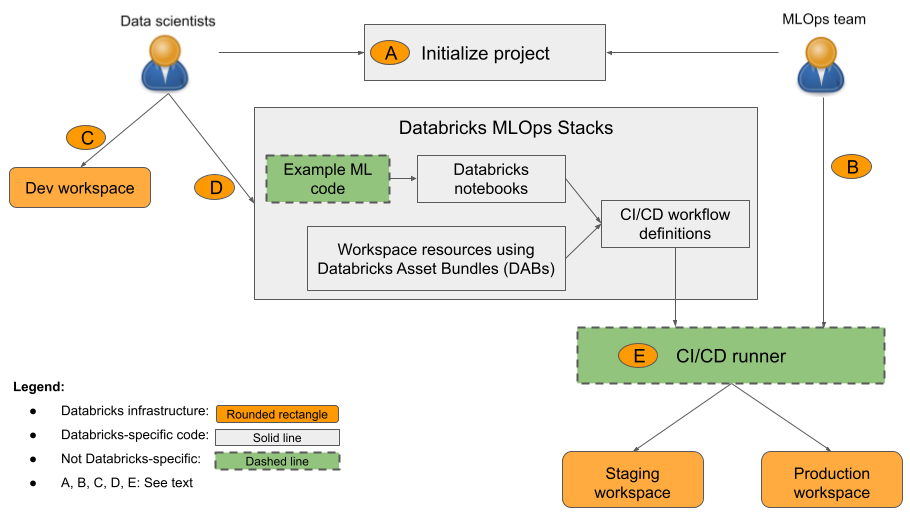
I’ve started adopting MLflow Recipes (formerly Pipelines) for my regression and classification tasks. It forces a separation of concerns: data ingestion, splitting, transforming, training, and registering are distinct steps defined in a YAML file. It reminds me a lot of how LlamaFactory News organizes fine-tuning, but for general ML.
The beauty of this is caching. If I change the training hyperparameter, the Recipe knows it doesn’t need to re-run the data ingestion step. When you are working with terabytes of data on Databricks or Snowflake Cortex News, avoiding redundant processing saves real money. It transforms the workflow from a script you run top-to-bottom into a directed acyclic graph (DAG) of cached artifacts.
Managing the Model Lifecycle
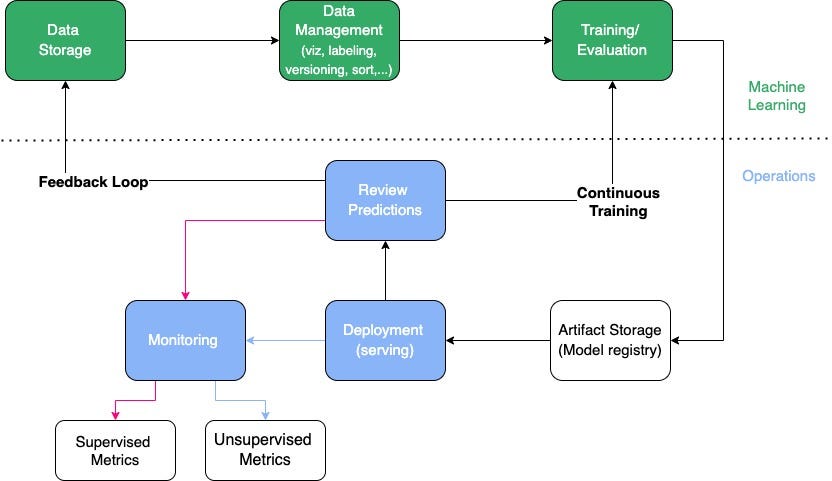
Finally, let’s talk about the Model Registry. This is the single source of truth. I have a strict rule: nothing goes into production unless it is in the Registry with the tag Production. We use webhooks to automate this. When a model is transitioned to Staging, it triggers a GitHub Action that runs integration tests using Pytest.
If those tests pass, we manually approve the promotion to Production. This might sound bureaucratic, but it prevents the “who changed the model?” panic. I can look at the Registry and see that User X promoted Model Version 12 at 10:00 AM. If DataRobot News or AWS SageMaker News are part of your deployment stack, MLflow can often sit in front of them, acting as the governance layer even if the compute happens elsewhere.
I also use the Registry to track my embedding models. With the rise of vector databases like Chroma News and Qdrant News, keeping track of which embedding model generated your vector index is critical. If you update the model but don’t re-index the database, your search results will be garbage. I link the vector DB collection name as a tag on the model version in MLflow to keep them synchronized.
Why This Matters Now
We are well past the experimentation phase of the AI hype cycle. In late 2025, the companies that are succeeding are the ones treating AI models like software artifacts, not magic crystals. The tools have matured to support this. Whether you are using JAX News for research or ONNX News for edge deployment, you need a central nervous system for your metadata.
I encourage you to look at your current setup. Are you afraid to re-run your training script because you might break something? Do you know exactly what data trained your current production model? If the answer is no, it’s time to stop treating MLOps as an optional add-on. Grab these tools, enforce some structure, and sleep better at night. I know I do.
The ecosystem is vast—from Weights & Biases News to Comet ML News and ClearML News—but the integration depth MLflow offers, especially with the recent focus on GenAI, makes it my default choice for building robust, scalable AI systems today.



