
I Built a News Agent to Fix My Morning Routine
I have a problem. Every morning, I sit down with my coffee and open about forty tabs. Hacker News, Twitter (or whatever we’re calling it this week), tech blogs, finance news. By the time I’m done “staying informed,” I’ve wasted an hour and my coffee is cold.
I tried RSS feeds. I tried those newsletter aggregators. They all suck. They either give you too much noise or they miss the context entirely.
So, last weekend, I decided to build something to fix it. I wanted an AI agent that doesn’t just “summarize a link” but actually goes out, finds the news on a topic, writes a summary, checks its own work, and then hands me a polished report.
The best part? It runs locally in my browser via Streamlit, uses Groq for speed (seriously, if you haven’t used Groq yet, you’re missing out), and Tavily for the searching. Here is how I hacked it together.
Why This Stack? (And Why Speed Matters)
There are a million ways to build an LLM app right now. But for a news agent, latency is the killer. If I ask for a summary of “AI regulation in Europe” and I have to wait 45 seconds for the model to think, I’m just going to open a new tab and Google it myself.
Groq solves this. It serves open-source models (like Llama 3) at speeds that feel instantaneous. It’s the difference between chatting with a person and sending emails back and forth.
Tavily is the search engine. I used to try scraping Google results with Selenium and BeautifulSoup. Never again. It’s brittle and breaks every time the DOM changes. Tavily just gives you the clean text context you need for an LLM. It’s built for agents, not humans.
And Streamlit? Look, I can write React, but I don’t want to write React. I want to write Python and have a UI appear. Streamlit is still the king of “I need a frontend in 5 minutes.”

The Architecture: It Needs to Critique Itself
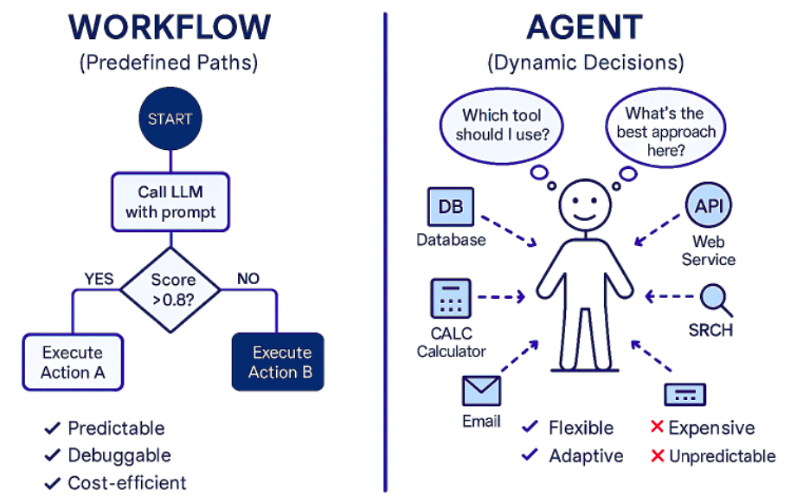
Here is where most people get it wrong. They build a simple pipeline: Search -> Summarize -> Print.
The problem is that LLMs are confident liars. They will hallucinate a date or mix up two similar companies. To fix this, I implemented a workflow that mimics how a human editor works. It’s not a straight line; it’s a loop.
- Browsing: The agent generates search queries based on my topic.
- Drafting: It reads the search results and writes an initial summary.
- Reflection (The Secret Sauce): The model acts as a “critic.” It reads the draft and the sources again, looking for errors or missing info.
- Refinement: It rewrites the summary based on the critique.
This “Reflection” step adds a second or two to the process, but the quality jump is massive. It catches about 90% of the hallucinations in my testing.
The Code
I’m not going to dump the whole repo here, but I’ll show you the core logic. You’ll need streamlit, groq, and tavily-python installed.
First, the imports and setup. You obviously need API keys for Groq and Tavily.
import streamlit as st
from groq import Groq
from tavily import TavilyClient
import json

# I usually keep these in st.secrets, but for testing just hardcode or use env vars
GROQ_API_KEY = st.secrets["GROQ_API_KEY"]
TAVILY_API_KEY = st.secrets["TAVILY_API_KEY"]

groq_client = Groq(api_key=GROQ_API_KEY)
tavily_client = TavilyClient(api_key=TAVILY_API_KEY)

# The model matters. Llama 3 70b is a beast on Groq.
MODEL_ID = "llama3-70b-8192"
Now, let’s define the search function. I’m keeping it simple: query goes in, context comes out.
def get_search_results(query):
    """Search the web and return a clean string of context."""
    response = tavily_client.search(query, search_depth="advanced", max_results=5)
    context = []
    for result in response['results']:
        context.append(f"Source: {result['url']}\nContent: {result['content']}")
    return "\n\n".join(context)
Here is the tricky part—the agent logic. I broke this down into two prompts. One to write, one to critique/refine. I found that if you ask the model to do everything in one prompt, it gets lazy.
def generate_news_summary(topic):
    # Step 1: Search
    with st.status("Browsing the web...", expanded=True) as status:
        st.write(f"Searching for latest news on: {topic}")
        context = get_search_results(topic)
        status.update(label="Found relevant articles!", state="running")

        # Step 2: Initial Draft
        st.write("Drafting initial summary...")
        draft_prompt = f"""
        You are a news reporter. Read the following context and write a detailed summary about '{topic}'.
        Context: {context}
        """

        draft_completion = groq_client.chat.completions.create(
            messages=[{"role": "user", "content": draft_prompt}],
            model=MODEL_ID
        )
        initial_draft = draft_completion.choices[0].message.content

        # Step 3: Critique & Refine (The Reflection Step)
        st.write("Critiquing and refining (checking for hallucinations)...")
        refine_prompt = f"""
        You are an editor. Read the following draft and the original context.
        Critique the draft for factual accuracy based ONLY on the context.
        Then, rewrite the draft to be more concise, punchy, and accurate.
        Add a catchy headline at the top.

        Original Context: {context}
        Current Draft: {initial_draft}
        """

        final_completion = groq_client.chat.completions.create(
            messages=[{"role": "user", "content": refine_prompt}],
            model=MODEL_ID
        )

        status.update(label="News ready!", state="complete")
        return final_completion.choices[0].message.content
Notice the st.status container? That’s a small UI detail, but it makes a huge difference. Users (aka me) hate staring at a frozen screen. Seeing “Browsing…” then “Drafting…” then “Refining…” makes the wait feel purposeful.
Putting it in the UI
The Streamlit interface is dead simple. A title, an input box, and a button. I added some session state logic so the summary doesn’t disappear if I accidentally click somewhere else.
st.set_page_config(page_title="AI News Agent", layout="wide")

st.title("🗞️ AI News Summarizer Agent")
st.markdown("Powered by **Groq**, **Tavily**, and **Streamlit**")

topic = st.text_input("What topic do you want to research?", placeholder="e.g., Nvidia stock performance this week")

if st.button("Get News"):
    if not topic:
        st.warning("Please enter a topic first.")
    else:
        summary = generate_news_summary(topic)
        st.markdown("### Latest Report")
        st.markdown(summary)

        # Save to history if you want
        if "history" not in st.session_state:
            st.session_state.history = []
        st.session_state.history.append({"topic": topic, "summary": summary})
Does It Actually Work?
I tested this yesterday with the topic “SpaceX Starship latest launch.”
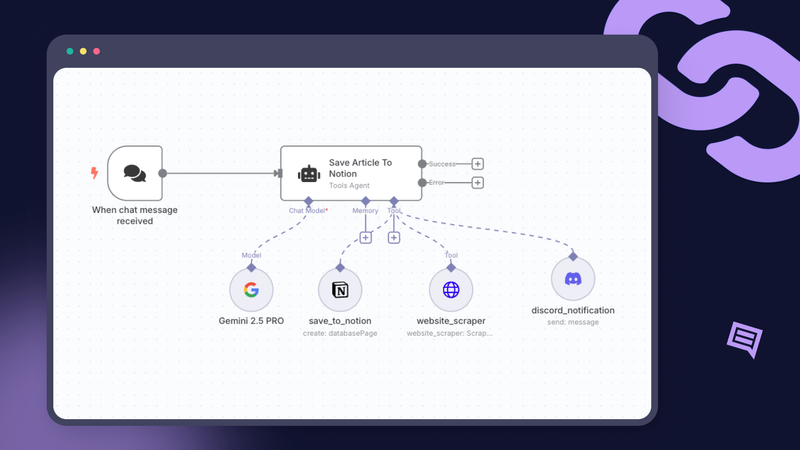
My first attempt without the reflection step was okay, but it grabbed a quote from an article three months ago and presented it as new. When I enabled the reflection step, the agent caught the discrepancy. The final output explicitly mentioned “In a recent update from this week…” and filtered out the stale data.
The speed is the killer feature here. The whole process—search, draft, critique, refine—takes about 4 to 6 seconds. That is fast enough that I don’t get distracted and wander off to check Instagram.
Room for Improvement
It’s not perfect. Sometimes Tavily returns paywalled content that confuses the model (though it’s getting better at handling that). And if the news is breaking breaking—like, happened 5 minutes ago—the search index might not have it yet.
But for getting a digest of what happened overnight in the AI world or the stock market? It’s a lifesaver. I’ve replaced my morning tab explosion with one Streamlit window. I type “AI news,” sip my coffee, and let the agents do the reading.