

Scaling AI-based Data Processing with Hugging Face + Dask: A Comprehensive Guide
Introduction: The Intersection of Big Data and Large Language Models
In the rapidly evolving landscape of artificial intelligence, the focus has shifted dramatically toward Large Language Models (LLMs) and massive-scale data ingestion. Following the explosion of interest generated by OpenAI News and the release of models like GPT-4, the industry is witnessing a paradigm shift. However, while models from Anthropic News, Cohere News, and Mistral AI News continue to push the boundaries of reasoning capabilities, the infrastructure required to feed these models remains a critical bottleneck.
Data scientists and ML engineers often hit a wall when moving from a prototype in Google Colab News to a production environment processing terabytes of unstructured text. Standard tools like Pandas or single-threaded Python scripts simply cannot handle the memory requirements needed for modern NLP tasks. This is where the synergy between Dask News and Hugging Face Transformers News becomes essential. Dask provides the parallel computing framework necessary to scale Python natively, while Hugging Face provides the state-of-the-art models required for modern AI applications.
This article explores how to architect scalable data processing pipelines that leverage Dask to parallelize Hugging Face transformer models. We will delve into distributed inference, batch processing for RAG (Retrieval-Augmented Generation) systems, and best practices for memory management, touching upon relevant ecosystem updates from PyTorch News, TensorFlow News, and LangChain News.
Section 1: Core Concepts of Distributed NLP
Before diving into code, it is crucial to understand why standard data loaders fail at scale and how Dask solves this. When working with libraries featured in Scikit-learn News or Apache Spark MLlib News, engineers are accustomed to different paradigms. Spark is excellent, but for Python-native workflows involving complex dependency injections like PyTorch models, Dask often offers a more seamless transition.
The Dask Computational Graph
Dask operates by building a task graph. Instead of executing operations immediately, it records them and executes them lazily. This allows Dask to optimize the execution plan and manage memory by loading only the necessary partitions of data into RAM. For NLP tasks, this means we can process a dataset larger than our machine’s memory by streaming it through a transformer model in chunks.
Setting Up the Environment
To get started, we need a robust environment. While AWS SageMaker News and Azure Machine Learning News highlight managed services, Dask allows you to replicate distributed clusters locally. Below is a setup script that initializes a local Dask cluster. This is the foundation for scaling workflows that might later use NVIDIA AI News driven GPUs.
import dask.dataframe as dd
from dask.distributed import Client, LocalCluster
import pandas as pd
import os

def initialize_cluster(n_workers=4, threads_per_worker=1):
    """
    Initializes a local Dask cluster optimized for compute-heavy NLP tasks.

    For Deep Learning tasks (PyTorch/TensorFlow), it is often better to have
    fewer threads per worker to avoid contention, especially if using GPUs.
    """
    cluster = LocalCluster(
        n_workers=n_workers,
        threads_per_worker=threads_per_worker,
        memory_limit='4GB' # Adjust based on your machine
    )
    client = Client(cluster)

    print(f"Dask Dashboard available at: {client.dashboard_link}")
    return client

# Initialize the client
client = initialize_cluster()

# Simulating a large dataset creation for demonstration
# In a real scenario, this would be read_parquet or read_csv from S3/GCS
data = {
    'text_id': range(10000),
    'raw_text': [
        "The quick brown fox jumps over the lazy dog. " * 5
        for _ in range(10000)
    ]
}
pdf = pd.DataFrame(data)

# Convert to Dask DataFrame with 10 partitions
ddf = dd.from_pandas(pdf, npartitions=10)

print(f"Dask DataFrame Structure: {ddf}")
In the context of Dask News, recent updates have improved the scheduler’s ability to handle “bursty” workloads, which is common when a partition suddenly requires heavy compute for a transformer inference step.
Section 2: Implementation – Distributed Inference with Map Partitions
The most common use case reported in Hugging Face News and Machine Learning communities is running batch inference—such as sentiment analysis, named entity recognition (NER), or embedding generation—over millions of rows.
The `map_partitions` Strategy
You cannot simply pass a loaded model object to Dask workers because standard PyTorch or TensorFlow models are not easily serializable (picklable) to be sent across a network. Instead, the best practice is to load the model inside the worker function or use Dask’s `map_partitions` API to apply a function to each chunk of the dataframe independently.
This approach aligns with patterns seen in Ray News, though Dask’s integration with Pandas makes it more intuitive for data engineers. Below is an implementation of a sentiment analysis pipeline using Hugging Face Transformers.
import torch
from transformers import pipeline
import dask.dataframe as dd
import numpy as np

def process_partition_sentiment(df, model_name="distilbert-base-uncased-finetuned-sst-2-english"):
    """
    This function runs on the worker node.
    It initializes the model locally to avoid serialization issues.
    """
    # Check for GPU availability on the worker
    device = 0 if torch.cuda.is_available() else -1

    # Initialize pipeline
    # Note: For production, consider caching the model loading to avoid
    # reloading it for every partition if workers persist.
    classifier = pipeline("sentiment-analysis", model=model_name, device=device)

    # Batch processing within the partition for speed
    # We convert the text column to a list for the pipeline
    texts = df['raw_text'].tolist()

    # Inference
    results = classifier(texts, batch_size=32, truncation=True)

    # Extract labels and scores
    df['sentiment_label'] = [r['label'] for r in results]
    df['sentiment_score'] = [r['score'] for r in results]

    return df

# Define metadata for Dask to understand the output structure
meta = {
    'text_id': int,
    'raw_text': object,
    'sentiment_label': object,
    'sentiment_score': float
}

# Apply the function across all partitions
# This is lazy; computation happens only when .compute() is called
result_ddf = ddf.map_partitions(
    process_partition_sentiment,
    meta=meta
)

# Trigger computation and retrieve head
# In production, you would likely use .to_parquet() instead of .compute()
print(result_ddf.head())
This method ensures that if you are following Meta AI News and using Llama 2 or 3, or utilizing models from Google DeepMind News, the heavy lifting is distributed. Each worker pulls the model weights (cached locally) and processes its slice of data.
Section 3: Advanced Techniques – Embeddings for Vector Databases
With the rise of RAG (Retrieval Augmented Generation), generating vector embeddings has become a primary workload. This connects directly to Pinecone News, Milvus News, Weaviate News, Qdrant News, and Chroma News. The goal is to turn text into vectors to be indexed.
When dealing with Sentence Transformers News, efficiency is key. We need to ensure that we are not just processing data, but doing so in a way that maximizes GPU utilization if available, similar to optimizations found in TensorRT News or ONNX News.
Handling Resources and Batching
In this advanced example, we will simulate a workflow that generates embeddings using a model like `all-MiniLM-L6-v2` and prepares the data for a vector store. We will also incorporate error handling, a critical aspect often discussed in MLflow News and LangSmith News for production reliability.
from sentence_transformers import SentenceTransformer
import dask.array as da

class EmbeddingWorker:
    """
    A class-based approach to handle model initialization
    and state within Dask workers.
    """
    model = None

    @classmethod
    def get_model(cls):
        if cls.model is None:
            device = 'cuda' if torch.cuda.is_available() else 'cpu'
            cls.model = SentenceTransformer('all-MiniLM-L6-v2', device=device)
        return cls.model

def generate_embeddings(df):
    """
    Generates embeddings for a partition of text.
    """
    try:
        model = EmbeddingWorker.get_model()

        # Encoding
        embeddings = model.encode(
            df['raw_text'].tolist(),
            batch_size=64,
            show_progress_bar=False,
            convert_to_numpy=True
        )

        # Assign embeddings to a new column
        # Note: Storing arrays in pandas cells can be tricky with Dask serialization
        # Often better to return a separate array or flatten
        df['embedding'] = list(embeddings)

    except Exception as e:
        df['embedding'] = None
        # In a real app, log this error to a monitoring service
        print(f"Error in partition: {e}")

    return df

# Apply embedding generation
# We adjust metadata to include the object type for embeddings
meta_embedding = meta.copy()
meta_embedding['embedding'] = object

embedded_ddf = ddf.map_partitions(
    generate_embeddings,
    meta=meta_embedding
)

# Writing to Parquet is the most efficient way to save Dask results
# This integrates well with Data Lakes (Snowflake Cortex News, Databricks)
output_path = "processed_data/embeddings.parquet"
# embedded_ddf.to_parquet(output_path, write_index=False)
# Commented out to prevent execution in this view, but this is the production step.
This pattern is vital for users following LlamaIndex News or Haystack News, as it allows for the creation of the underlying knowledge base required for complex QA systems. By offloading the embedding generation to a Dask cluster, you can process millions of documents in a fraction of the time it takes sequentially.
Section 4: Best Practices and Optimization
Scaling AI is not just about writing code; it is about architecture. Whether you are deploying on Vertex AI News infrastructure or using RunPod News for GPU rental, the following best practices apply.
1. Partition Sizing
A common pitfall discussed in Dask News forums is improper partition sizing. If partitions are too small, the overhead of task scheduling dominates the execution time. If they are too large, workers run out of memory (OOM).
* Tip: Aim for partitions that fit comfortably in the worker’s memory, typically around 100MB to 500MB for text data.
* Tools: Use `ddf.repartition(npartitions=X)` to adjust before heavy compute.
2. Monitoring and Observability
Blindly running distributed jobs is dangerous. Utilize the Dask Dashboard (port 8787 by default) to visualize task streams. For experiment tracking, integrate tools highlighted in Weights & Biases News, Comet ML News, or ClearML News. You can log metrics from within the worker functions, provided the logging client is thread-safe.
3. GPU Management with CUDA
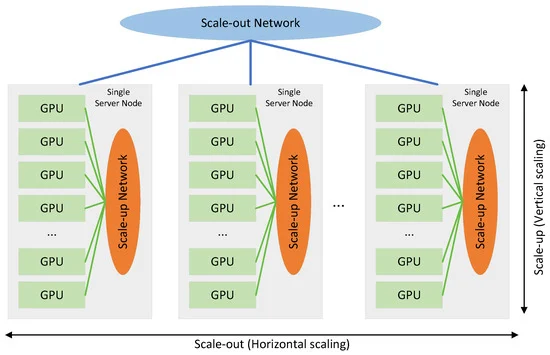
If you are leveraging NVIDIA AI News hardware, ensure that Dask workers are configured to see specific GPUs. In a setup with 4 GPUs and 4 Dask workers, set the `CUDA_VISIBLE_DEVICES` environment variable for each worker process so they don’t contend for the same GPU memory. This is crucial when using large models from Ollama News or vLLM News.
4. Format Selection
Avoid CSVs for intermediate storage. As emphasized in Apache Spark MLlib News and Dask News, Parquet is the gold standard. It supports compression and column pruning, which drastically speeds up I/O operations.
# Example of efficient saving with compression
# This is compatible with AWS SageMaker News data inputs
def save_efficiently(dask_df, path):
    dask_df.to_parquet(
        path,
        engine='pyarrow',
        compression='snappy',
        write_index=False,
        overwrite=True
    )
Conclusion
The convergence of scalable computing and advanced AI models is reshaping how we handle data processing. By combining the flexibility of Dask News updates with the power of the Hugging Face ecosystem, developers can build pipelines that are both robust and scalable.
We are moving away from the era of “small data” ML towards an era defined by Generative AI and massive context windows. Whether you are following OpenAI News for the latest GPT models, or Meta AI News for open-source alternatives, the need to process, tokenize, and embed data at scale remains constant.
As tools like AutoML News and Optuna News continue to evolve, we can expect Dask to play an even larger role in hyperparameter tuning and model selection. For now, mastering the `map_partitions` pattern with Transformers is a superpower for any Data Engineer or ML Practitioner looking to escape the constraints of a single machine.
Next Steps
To further your journey, consider exploring:
1. Ray News for alternative orchestration if your workflow is purely Deep Learning based.
2. FastAPI News to wrap your Dask-powered inference engine into a queryable microservice.
3. LangChain News to integrate your processed embeddings into a full RAG application.
By staying updated with Artificial Intelligence trends and mastering distributed systems, you position yourself at the cutting edge of the Digital Event Horizon.



