
Secure AI in Hex: Running Claude Inside Snowflake Cortex
I’ve lost count of how many times I’ve had to kill a project—or at least neuter it significantly—because InfoSec took one look at the architecture diagram and saw data leaving our VPC. It’s the classic data engineering struggle: you want the smart tools, but you can’t have the data exposure.
Actually, that’s why the recent integration of Claude into Snowflake Cortex, specifically powering Hex Magic, is actually worth talking about. It’s not just another “AI feature” tacked onto a dashboard. But it solves the one problem that actually stops us from using LLMs on production data: trust.
I spent the last few days messing around with this setup, connecting my Hex notebooks directly to the Cortex-hosted Claude models. And here’s the messy reality of how it works and why—for once—I didn’t have to fight for security approval.
The Architecture Shift
Usually, when you use AI in a notebook tool, the flow looks like this: Your data sits in the database. You query it. The notebook tool takes a sample, serializes it, and fires it off to an API endpoint (OpenAI, Anthropic, whatever) over the public internet. The model does its math, sends back a response, and you get your SQL or Python code.
That middle step? The “fires it off to an API” part? That’s where the red flags fly.
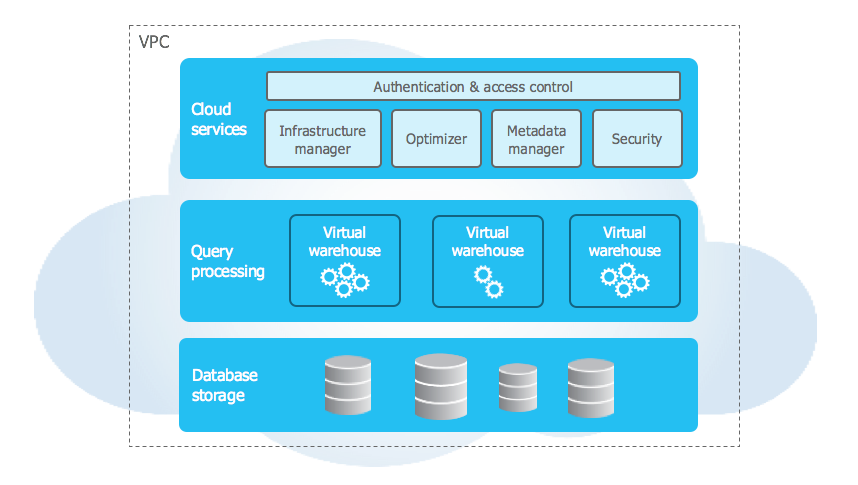
But with this Cortex integration, the topology changes. Hex Magic sends the instruction to Snowflake, and the data processing and the model inference happen within the Snowflake security perimeter. The data doesn’t traverse the open web to get to Anthropic’s servers. It stays in the account.
I tested this on a dataset containing some mock PII (hashed emails and transaction IDs) just to see the trace. And no egress traffic to api.anthropic.com. Everything stayed internal to the Snowflake service endpoints.
Why Claude Specifically?
We’ve had access to other models in Cortex for a bit—Llama 3 and some Mistral variants—but let’s be honest. When you’re asking an LLM to generate complex Snowpark Python code or debug a nasty recursive CTE, reasoning capability matters more than raw speed.
I ran a side-by-side test last Tuesday. I had a messy messy JSON column in a variant table that needed flattening and joining against a dimensional table with a slowly changing dimension (SCD) Type 2 structure.
The Prompt: “Write a query to flatten raw_events, extract the ‘campaign_id’, and join it to dim_campaigns respecting the valid_from and valid_to timestamps for the event date.”
The smaller open-source models hallucinated column names or messed up the SCD logic (joining on current state only). But Claude 3.5 Sonnet (running inside Cortex) nailed the BETWEEN logic on the first try. That saves me twenty minutes of debugging. Probably saves me five times a day, so it adds up.
Under the Hood: Calling Cortex
While Hex wraps this in a nice UI (the “Magic” cells), it’s worth understanding what’s happening at the SQL level because you can actually do this yourself if you want to build custom apps outside of Hex.
You’re essentially invoking a Cortex system function. If you were to bypass the Hex UI and run this in a worksheet, it looks something like this:
-- This is effectively what's running behind the scenes
SELECT SNOWFLAKE.CORTEX.COMPLETE(
    'claude-3-5-sonnet',
    CONCAT(
        'Analyze this sales data schema: ',
        GET_DDL('TABLE', 'SALES_DB.RAW.TRANSACTIONS'),
        ' and write a query to find the top 5 regions by revenue growth YoY.'
    )
) AS magic_response;
The fact that Hex abstracts this away is nice, but knowing the underlying mechanism is crucial when things break or when you hit quota limits. Speaking of limits—check your Snowflake compute usage. These Cortex calls consume credits. It’s not free, but it’s definitely cheaper than hiring a junior analyst to write bad SQL for three hours.
Real-World Friction Points
It’s not all perfect. I did run into a few snags during my testing this week.
First, context windows. While Claude has a massive context window generally, the implementation within Cortex (and how Hex passes the schema metadata) isn’t infinite. I tried to feed it the DDL for our entire ERP schema—about 400 tables—and it choked. You still need to be selective about which tables you bring into the context for the Magic cell. Don’t just dump the whole database schema in there.
And second, latency. It’s slightly slower than hitting the direct API. We’re talking milliseconds, maybe a second or two difference, but if you’re used to the instant gratification of a local copilot, the round-trip time through the Snowflake governance layer is noticeable. Not a dealbreaker, but noticeable.
The “Sleep at Night” Factor

The biggest win here isn’t technical; it’s bureaucratic. I work with healthcare data occasionally. And the sheer amount of paperwork required to approve a new sub-processor for data is a nightmare.
But because Snowflake is already an approved vendor for us, enabling Cortex features didn’t require a new vendor security assessment. It was just a feature toggle. That is huge. I didn’t have to explain to a compliance officer who “Anthropic” is or why we need to send them JSON snippets. The contract is with Snowflake; the data stays in Snowflake.
Is it worth the switch?
If you’re already in the Hex and Snowflake ecosystem, absolutely. The integration is tight. I switched my default model in Hex settings to Claude-on-Cortex yesterday and haven’t looked back.
The SQL generation is sharper than the default models we were using in late 2025, and the Python explanations are actually coherent. But just keep an eye on your credit consumption—it’s easy to get carried away when the magic actually works.
Frequently asked questions
How does Claude running in Snowflake Cortex keep data inside the VPC?
When Hex Magic calls Claude through Snowflake Cortex, the instruction is sent to Snowflake and both data processing and model inference happen within the Snowflake security perimeter. Data does not traverse the public internet to reach Anthropic’s servers. Testing with mock PII showed no egress traffic to api.anthropic.com—everything stayed on internal Snowflake service endpoints, which is why InfoSec approval becomes much simpler.
Why choose Claude over Llama 3 or Mistral inside Snowflake Cortex?
Reasoning capability matters more than raw speed when generating complex Snowpark Python or debugging recursive CTEs. In a side-by-side test flattening a JSON variant column and joining against an SCD Type 2 dimension table, smaller open-source models hallucinated column names or joined only on current state. Claude 3.5 Sonnet running inside Cortex correctly handled the BETWEEN logic on valid_from and valid_to timestamps on the first attempt.
How do you call Claude directly from a Snowflake worksheet without Hex?
You invoke the SNOWFLAKE.CORTEX.COMPLETE system function, passing ‘claude-3-5-sonnet’ as the model name and a prompt string as the second argument. The prompt can be built with CONCAT and GET_DDL to inject table schemas, for example asking it to analyze a TRANSACTIONS table and write a YoY revenue query. Hex’s Magic cells wrap this same SQL call behind their UI abstraction.
What are the limitations of using Claude in Hex Magic through Cortex?
Two friction points stand out. Context windows inside Cortex are not infinite—feeding the DDL for a 400-table ERP schema caused it to choke, so you must be selective about which tables enter the Magic cell context. Latency is also slightly higher than hitting Anthropic’s direct API, adding roughly a second of round-trip time through Snowflake’s governance layer. Cortex calls also consume Snowflake credits.