
Architecting Scalable AI: A Deep Dive into Milvus Vector Database for RAG and Semantic Search
Introduction: The Backbone of Modern AI Infrastructure
In the rapidly evolving landscape of artificial intelligence, the ability to manage, index, and retrieve unstructured data has become the cornerstone of successful machine learning applications. While recent OpenAI News and Anthropic News often focus on the generative capabilities of Large Language Models (LLMs), the “memory” of these systems is equally critical. This is where vector databases come into play, and Milvus stands out as a premier open-source solution designed for cloud-native environments.
Milvus is not just a storage layer; it is a comprehensive vector similarity search engine capable of handling billions of vectors with millisecond-level latency. As organizations move from proof-of-concept to production, the limitations of storing embeddings in traditional relational databases or simple in-memory arrays become apparent. Recent Milvus News highlights the platform’s ability to solve these scalability challenges, making it an essential tool for implementing Retrieval-Augmented Generation (RAG), recommendation systems, and semantic search engines.
In this comprehensive guide, we will explore the architecture of Milvus, integrate it with popular frameworks found in PyTorch News and TensorFlow News, and discuss best practices for optimization. Whether you are following LangChain News for orchestration or LlamaIndex News for data ingestion, understanding Milvus is pivotal for building robust AI applications.
Section 1: Core Concepts and Architecture
To leverage Milvus effectively, one must understand how it differs from traditional databases like PostgreSQL or NoSQL solutions. Milvus is built around the concept of vector embeddings—numerical representations of data (text, images, audio) generated by models such as those discussed in Hugging Face News or Sentence Transformers News.
The Milvus Architecture
Milvus adopts a storage-compute disaggregation architecture. This design allows for independent scaling of storage and computing nodes, which is crucial for cloud deployments discussed in AWS SageMaker News and Azure Machine Learning News. The architecture consists of:
- Access Layer: The front end that handles user requests and acts as a load balancer.
- Coordinator Service: Manages topology and assigns tasks to worker nodes.
- Worker Nodes: Executes the actual data manipulation and search commands.
- Storage: Relies on object storage (like S3 or MinIO) for persistence.
Collections, Partitions, and Entities
Data in Milvus is organized into collections, which are analogous to tables in relational databases. Within collections, data can be divided into partitions to accelerate search by narrowing down the scope. An entity represents a single object, containing a primary key and a vector field, along with optional scalar fields (metadata).
Below is a practical example of how to connect to a Milvus server and define a schema. This setup is often the first step before integrating with pipelines mentioned in Haystack News or FastAPI News.
from pymilvus import (
    connections,
    utility,
    FieldSchema,
    CollectionSchema,
    DataType,
    Collection,
)

# 1. Connect to the Milvus server
# In a production environment, this might be a Kubernetes cluster
# or a managed Zilliz Cloud instance.
connections.connect("default", host="localhost", port="19530")

# 2. Define the Schema
# We need a primary key, the vector data, and perhaps some metadata.
def create_milvus_collection(collection_name, dim):
    if utility.has_collection(collection_name):
        utility.drop_collection(collection_name)

    # Primary key (Int64)
    id_field = FieldSchema(
        name="id",
        dtype=DataType.INT64,
        is_primary=True,
        auto_id=True
    )

    # Vector field (FloatVector)
    # dim=768 is common for BERT-based models found in Hugging Face Transformers News
    vector_field = FieldSchema(
        name="embedding",
        dtype=DataType.FLOAT_VECTOR,
        dim=dim
    )

    # Scalar field for metadata filtering
    category_field = FieldSchema(
        name="category",
        dtype=DataType.VARCHAR,
        max_length=200
    )

    schema = CollectionSchema(
        fields=[id_field, category_field, vector_field],
        description="Knowledge Base Embeddings"
    )

    # 3. Create the Collection
    collection = Collection(
        name=collection_name,
        schema=schema,
        using='default'
    )

    print(f"Collection {collection_name} created successfully.")
    return collection

# Initialize collection
my_collection = create_milvus_collection("enterprise_rag_db", 768)
Section 2: Implementation Details and Data Ingestion
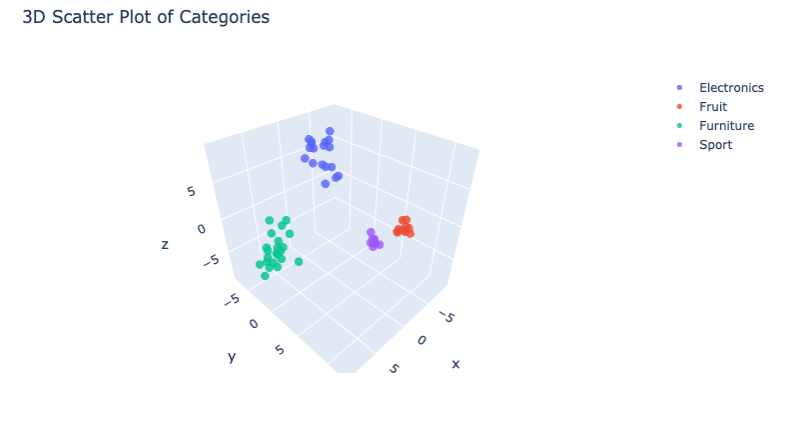
Once the schema is defined, the next challenge is efficient data ingestion and indexing. In the context of DataRobot News or Snowflake Cortex News, the pipeline usually involves extracting text, chunking it, generating embeddings, and inserting them into Milvus.
Generating Embeddings
Before insertion, raw data must be converted into vectors. While you might use APIs discussed in Cohere News or Google DeepMind News, local inference using Ollama News or vLLM News is becoming increasingly popular for privacy-centric applications. Libraries like sentence-transformers provide an easy bridge for this.
Indexing Strategies
Milvus supports various index types to balance search speed and recall accuracy.
- FLAT: Exact search. 100% recall but slow on large datasets.
- IVF_FLAT: Inverted File Index. Divides vector space into clusters. Fast, but slightly lower recall.
- HNSW: Hierarchical Navigable Small World. The industry standard for graph-based indexing, offering high performance and recall. Often highlighted in FAISS News and Qdrant News comparisons.
The following code snippet demonstrates how to insert data and build an index. This workflow is compatible with MLOps practices seen in MLflow News and ClearML News.
import random
import numpy as np

# Simulate data generation
# In a real app, these would come from an embedding model
num_entities = 10000
dim = 768

# Generate random vectors
vectors = [[random.random() for _ in range(dim)] for _ in range(num_entities)]
# Generate random categories for metadata filtering
categories = [random.choice(['finance', 'legal', 'tech', 'hr']) for _ in range(num_entities)]

# Prepare data for insertion (list of columns)
data = [
    categories,
    vectors
]

# 1. Insert Data
# Milvus handles data in segments. Frequent small inserts can cause fragmentation.
# It is best practice to batch inserts.
mr = my_collection.insert(data)
print(f"Inserted {len(mr.primary_keys)} entities.")

# 2. Build Index
# Creating an index is crucial for search performance.
# HNSW is generally the best all-rounder for performance.
index_params = {
    "metric_type": "L2", # Euclidean Distance
    "index_type": "HNSW",
    "params": {"M": 8, "efConstruction": 64}
}

my_collection.create_index(
    field_name="embedding",
    index_params=index_params
)

print("Index built successfully.")

# 3. Load Collection to Memory
# Unlike traditional DBs, Milvus requires explicit loading for search.
my_collection.load()
Section 3: Advanced Techniques and Hybrid Search
As the complexity of AI applications grows, simple vector search is often insufficient. Developers following LangChain News are increasingly adopting Hybrid Search—combining semantic vector search with keyword-based filtering. This approach ensures that the retrieved results are not only semantically similar but also contextually relevant based on metadata.
Metadata Filtering
Milvus allows for boolean expression filtering during the search process. This is similar to the “WHERE” clause in SQL. For instance, if you are building a legal discovery tool, you might want to find documents semantically similar to a query but strictly limited to the “contracts” category. This capability keeps Milvus competitive against other vector stores mentioned in Pinecone News and Weaviate News.
Integration with RAG Pipelines
In a Retrieval-Augmented Generation setup, Milvus acts as the context provider. When a user asks a question, the system embeds the query, searches Milvus, retrieves the top-k chunks, and feeds them into an LLM (like GPT-4 or Claude 3, often discussed in OpenAI News and Anthropic News). Tools like LangSmith News help trace these complex chains.
Here is an example of performing a similarity search with a metadata filter, a common pattern in Streamlit News and Gradio News tutorials for building AI apps.

# Define search parameters
# 'ef' controls the search accuracy/speed trade-off in HNSW
search_params = {
    "metric_type": "L2",
    "params": {"ef": 64}
}

# Generate a query vector (simulated)
query_vector = [[random.random() for _ in range(dim)]]

# Perform Search with Metadata Filtering
# We only want results where the category is 'tech'
search_results = my_collection.search(
    data=query_vector,
    anns_field="embedding",
    param=search_params,
    limit=5,
    expr="category == 'tech'", # Boolean filtering
    output_fields=["category"] # Return metadata in results
)

print(f"Found {len(search_results[0])} matches.")

for hits in search_results:
    for hit in hits:
        print(f"ID: {hit.id}, Distance: {hit.distance}, Category: {hit.entity.get('category')}")
Section 4: Best Practices, Optimization, and Ecosystem
Deploying Milvus in production requires careful consideration of hardware and configuration. Following updates in NVIDIA AI News, utilizing GPU acceleration for indexing and search can significantly boost throughput. Furthermore, integration with monitoring tools discussed in Weights & Biases News or Comet ML News is vital for maintaining system health.
Consistency Levels
Milvus offers tunable consistency levels (Strong, Bounded, Session, Eventually). For most RAG applications, “Bounded” is a good default, offering a balance between search latency and data freshness. If you are building a real-time system similar to those seen in Kaggle News competitions, understanding these trade-offs is essential.
Partitioning Strategy
While partitions improve search speed, over-partitioning can lead to management overhead. A general rule of thumb is to use partitions for broad categories (e.g., tenant IDs in a SaaS app) and scalar filtering for more granular attributes.
Ecosystem Integration
Milvus does not exist in a vacuum. It integrates seamlessly with:

- ETL Tools: Airflow or tools mentioned in Apache Spark MLlib News for data processing.
- Model Serving: Triton Inference Server News and Ray News highlight how to serve the embedding models that feed Milvus.
- Evaluation: Using Ragas or techniques from AutoML News to evaluate the quality of retrieved context.
Asynchronous Operations
For high-throughput applications, such as those built with FastAPI News, using the asynchronous API of Milvus is recommended to prevent blocking operations.
import asyncio
from pymilvus import Collection, connections

# Asynchronous search wrapper example
async def async_search(collection_name, query_vectors):
    # Re-establish connection inside the async context if necessary
    connections.connect("default", host="localhost", port="19530")

    collection = Collection(collection_name)
    collection.load()

    search_params = {"metric_type": "L2", "params": {"nprobe": 10}}

    # Run the blocking search method in a separate thread
    loop = asyncio.get_running_loop()
    future = loop.run_in_executor(
        None,
        lambda: collection.search(
            data=query_vectors,
            anns_field="embedding",
            param=search_params,
            limit=3
        )
    )

    results = await future
    return results

# Usage in an async framework (like FastAPI)
# await async_search("enterprise_rag_db", query_vectors)
Conclusion
Milvus has established itself as a critical component in the modern AI stack. By providing a scalable, feature-rich environment for vector similarity search, it enables developers to bridge the gap between static data and dynamic intelligence. As we see in Google Colab News and Replicate News, the barrier to entry for building complex AI systems is lowering, but the need for robust infrastructure remains high.
From handling embeddings generated by models in Mistral AI News to integrating with orchestration layers in LangChain News, Milvus offers the flexibility and performance required for enterprise-grade applications. As you move forward, consider exploring the advanced features of Milvus, such as disk-based indexing for massive datasets (saving RAM) and multi-vector search for richer semantic understanding.
The vector database landscape is competitive, with updates frequently appearing in Chroma News and Elasticsearch News, but Milvus’s commitment to open-source and cloud-native principles makes it a compelling choice for engineers looking to future-proof their AI architecture. Start small, optimize your indexing strategy, and scale your vector search capabilities to unlock the full potential of your data.