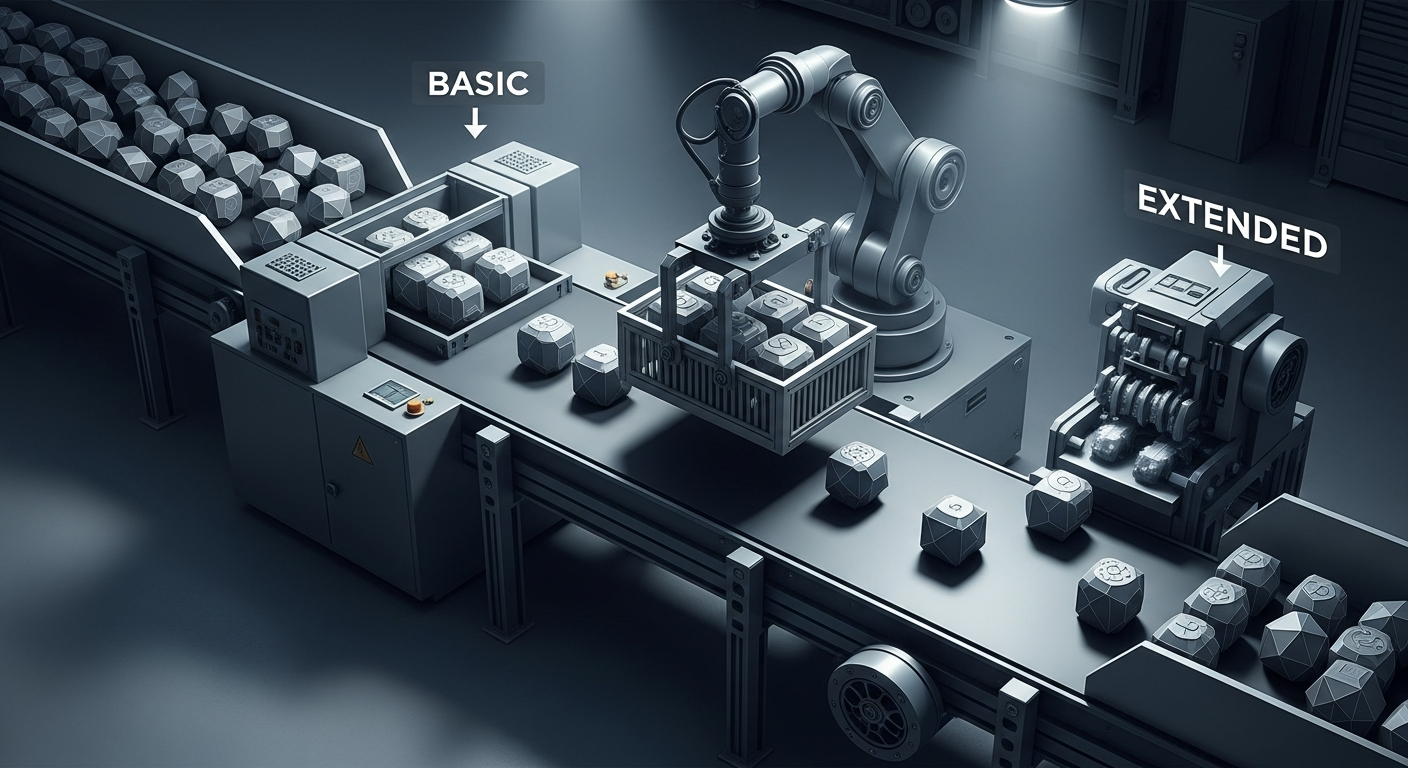
ONNX Runtime optimization levels: which fusions fire where
Last updated: May 22, 2026
ONNX Runtime optimization levels look like a three-step dial — BASIC, EXTENDED, ALL — but the level you pick only governs nodes your execution provider hasn’t already claimed. BASIC ⊂ EXTENDED ⊂ ALL holds in name, yet EXTENDED runs after partitioning, ALL’s only real delta over EXTENDED is an x86-CPU NCHWc layout pass, and setting ORT_ENABLE_ALL behind TensorRT leaves most transformer fusions on the floor because TRT swallowed the subgraph whole.
More on Onnx Runtime Optimization Levels.
- BASIC ⊂ EXTENDED ⊂ ALL, but on non-x86 hardware
ALL≡EXTENDEDin practice because the only delta is the NCHWc layout pass. - BASIC runs before partitioning, EXTENDED runs after — so any subgraph claimed by TensorRT, OpenVINO, or another whole-subgraph EP skips Extended fusions entirely.
- Layout-optimized offline models are hardware-locked — a graph saved after an AVX2-targeted NCHWc rewrite will refuse to run on a CPU without AVX2 instructions.
- At opset ≥ 17, LayerNorm fusion is a no-op because
LayerNormalizationis a native op; the pattern matcher had nothing to fuse. - Optimum O2 ≠ ORT EXTENDED: O2 layers transformer-specific Attention/MLP fusions on top of stock Extended, so node counts will diverge between the two pipelines.
The optimization levels in one paragraph — and why two of them are usually the same
According to the official Microsoft documentation, each graph optimization level enables everything in the prior level plus its own additions, which is why the canonical anchor point for advice is “set EXTENDED unless you have a reason not to.” That advice is correct most of the time and misleading in two important cases: when you ship to x86 CPU (where ALL is meaningfully more than EXTENDED) and when your hot path is owned by an execution provider that takes its subgraph whole.
The Microsoft graph optimizations reference describes the levels but does not foreground a critical mechanical detail: where in the session-init lifecycle each level runs. That ordering is the difference between “enabling a level” and “actually getting the fusions.”
Basic vs Extended is really a question of WHEN, not WHAT
The most useful way to think about Basic and Extended is by their position in the session-initialization pipeline rather than by the list of passes each one names. Basic-tier rewrites — constant folding, redundant node elimination, Conv–BN fusion, Conv–Add fusion, Conv–Mul fusion, common subexpression elimination — are semantics-preserving rewrites that operate on the whole graph as a single ONNX object. They run before the runtime assigns nodes to execution providers, which is why they apply to every EP without exception.
Extended-tier rewrites — GELU fusion, LayerNorm fusion, MatMul scale fusion, BERT Attention fusion, EmbedLayerNormalization, SkipLayerNormalization, FusedGemm — are different. They are scoped to a specific provider (CPU, CUDA, ROCm) and they run after the partitioner has already split the graph into per-EP subgraphs. The implication: a node has to be assigned to a supported EP before the matching Extended fusion can touch it. You can confirm the per-EP scoping by reading the level-2 registration in the upstream optimizer source tree, where transformer-style fusions live under provider-specific factories.
This ordering is what turns “level selection” from a binary toggle into a partitioning question. If your model has been chunked so the transformer block ends up on a non-supported EP, none of the Extended transformer fusions will fire on it regardless of what level you asked for. That sentence is the article in one line.
A fusion-by-fusion map of what actually fires at each level
The most common reason engineers can’t predict whether a fusion will trigger is that the docs name the fusion without describing the IR pattern it matches. The table below is the version I keep in my head when staring at a Netron view, mapping each rewrite to the substructure it looks for, the level required, and the executors that can host it.
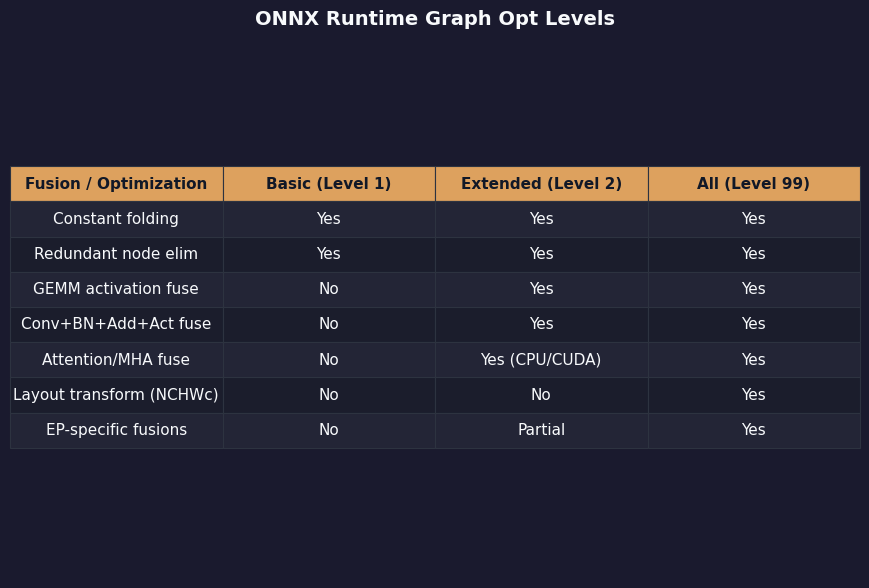
The comparison summarizes the official enum-to-pass mapping into the shape readers actually need: not “which level enables this” but “which level and which EP enables this, and what does the matched pattern look like in your graph?” The same information is buried in the upstream optimizer directory listing, but a flat directory does not communicate the level boundaries.
See also low-level quantization tradeoffs.
| Fusion | Pattern matched | Min level | EPs | Opset sensitivity |
|---|---|---|---|---|
| Constant folding | Subgraph with all-constant inputs | BASIC | All EPs (pre-partition) | — |
| Conv–BN fusion | Conv → BatchNormalization in inference mode | BASIC | All EPs (pre-partition) | — |
| Conv–Add / Conv–Mul | Conv followed by Add/Mul with broadcastable constant | BASIC | All EPs (pre-partition) | — |
| GELU fusion | Decomposed GELU: 0.5 * x * (1 + erf(x / √2)) |
EXTENDED | CPU, CUDA, ROCm | No-op at opset ≥ 20 where Gelu is native |
| LayerNorm fusion | ReduceMean → Sub → Pow → ReduceMean → Sqrt → Div → Mul → Add | EXTENDED | CPU, CUDA, ROCm | No-op at opset ≥ 17 where LayerNormalization is native |
| SkipLayerNormalization | Add (residual) → LayerNormalization | EXTENDED | CUDA-favoured; CPU supported | Requires LayerNorm already fused or native |
| EmbedLayerNormalization | Token + position + segment embeddings → Add → LayerNormalization | EXTENDED | Transformer-class only | BERT/RoBERTa-shaped graphs |
| Attention fusion | Q/K/V MatMul triplet + scale + softmax + MatMul | EXTENDED | CUDA-favoured | Encoder attention; decoder shapes use a separate matcher |
| NCHWc layout transform | Conv chains on x86 with AVX2/AVX-512 | ALL | CPU only, x86 only | Hardware-locked to ISA the graph was compiled against |
Two rows in this table change behaviour silently as opset versions move. The LayerNorm pattern is matched as a decomposition of seven primitive ops, and that match fails the moment your exporter writes the native LayerNormalization op instead — which is exactly what happens at opset 17 and later per the ONNX changelog. The graph already says “this is a LayerNorm,” so there is nothing for the fusion to do. The same logic applies to GELU at opset 20, where Gelu became a first-class op.
The partitioning gotcha: why ORT_ENABLE_ALL with TensorRT EP gives you almost no ORT fusions
This is the case that sends people to the ORT issue tracker. The setup: a BERT-class model exported to ONNX, loaded with graph_optimization_level=ORT_ENABLE_ALL, and a session built with providers=['TensorrtExecutionProvider', 'CUDAExecutionProvider']. The user expects “ALL” to layer Extended fusions on top of TensorRT’s own optimizer. What they get is something else: TensorRT claims the bulk of the graph as a single fused subgraph and ORT’s Extended transformer fusions, which run after partitioning, find nothing on the CUDA fallback partition because there is nothing transformer-shaped left there to match.
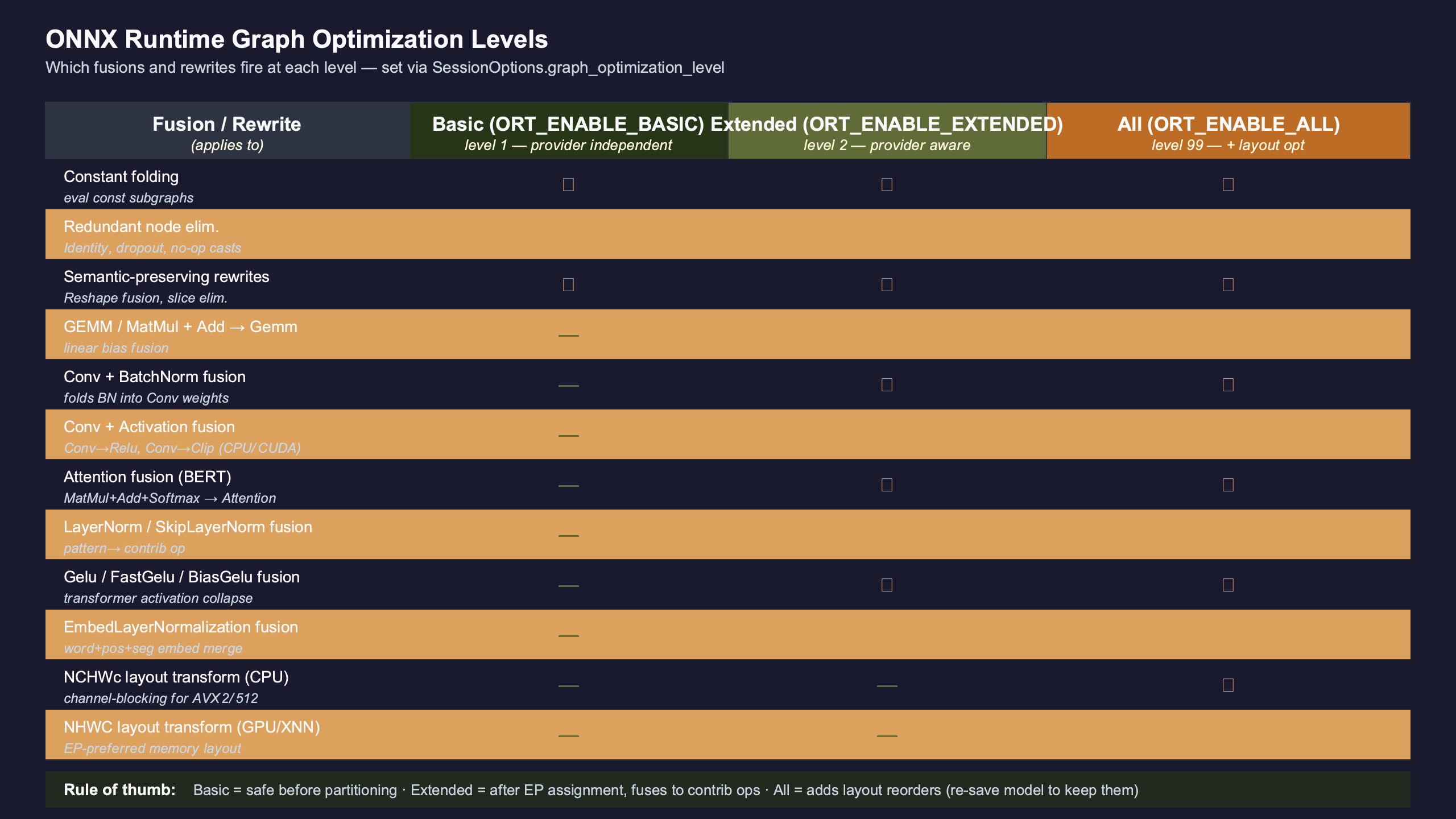
Purpose-built diagram for this article — Inside ONNX Runtime’s graph optimization levels: which fusions fire at Basic vs Extended vs All.
More detail in KV cache block layout.
The diagram makes the asymmetry visible: the moment one subgraph is claimed by a whole-subgraph EP, the post-partition fusion pass walks a graph in which the dense transformer block has already been replaced by a single TRTKernel node. There is no Attention triple to fuse, no decomposed LayerNorm to collapse, no Embedding stack to recognize. That is not a bug — it is the intended division of labour between ORT and a whole-graph EP. But it is also the reason “level” stops being load-bearing on a TRT-fronted session: TensorRT’s own fusion engine will do the same kind of work, and ORT’s settings primarily govern the leftover CPU/CUDA partition.
If you only learn one verification habit from this article, make it this: dump the post-optimization graph and count nodes per opname before assuming a level setting did what you think it did. The Python API reference documents SessionOptions.optimized_model_filepath; that is the artifact that makes the question answerable.
A verification loop for ONNX Runtime fusions: prove what actually fired
There are two evidence sources ONNX Runtime gives you for free and most users never enable. The first is optimized_model_filepath, which writes the post-optimization graph to disk so you can open it in Netron and count what survived. The second is log_severity_level=0 (VERBOSE), which surfaces a one-line record for every fusion the optimizer ran, including the count of substitutions and the status.
import onnxruntime as ort

sess_options = ort.SessionOptions()
sess_options.graph_optimization_level = ort.GraphOptimizationLevel.ORT_ENABLE_EXTENDED
sess_options.optimized_model_filepath = "bert_ort_extended.onnx"
sess_options.log_severity_level = 0  # VERBOSE: name every transformer that fires

session = ort.InferenceSession(
    "bert_base_uncased.onnx",
    sess_options=sess_options,
    providers=["CPUExecutionProvider"],
)
Run that against a BERT-base export and the log stream includes lines that name each fusion as it modifies the graph — GeluFusion, LayerNormFusion, SkipLayerNormFusion, AttentionFusion and so on — together with how many substitutions each one made. That log line is the canonical signal that a fusion was matched and applied, and it is the closest thing ORT has to “did the thing I asked for actually happen.”
Background on this in measuring real latency wins.
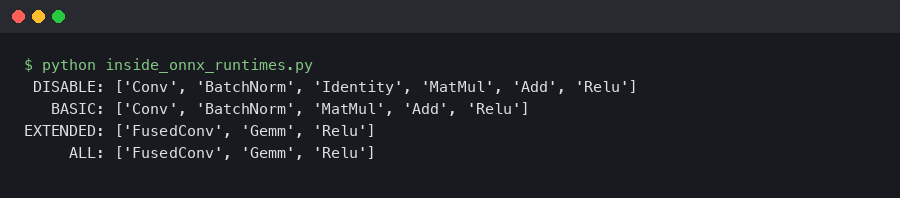
The terminal capture shows the verbose log lines next to the resulting node count from a Netron-style scan. A BertAttention node where seven separate ops used to be is the visible proof that Extended did its job; a flat row of MatMul, Add, Softmax, and MatMul still standing after ORT_ENABLE_EXTENDED means the matcher rejected the pattern — usually due to a shape constraint, an unexpected cast, or a layer-norm position the matcher does not recognize.
Reconciling ORT’s BASIC / EXTENDED / ALL with Optimum’s O1 / O2 / O3 / O4
Hugging Face’s Optimum optimizer documentation uses a different vocabulary — O1, O2, O3, O4 — and the mapping is not the one-to-one cross-walk it appears to be. Stock ORT BASIC ≈ Optimum O1. The interesting case is O2, which is not a synonym for EXTENDED: it layers Optimum’s transformer-specific fusions (specialised attention shapes, gated-MLP fusions, model-family templates) on top of ORT’s Extended pass. O3 enables GELU Approximation, and O4 turns on FP16 conversion, which is orthogonal to the levels entirely.
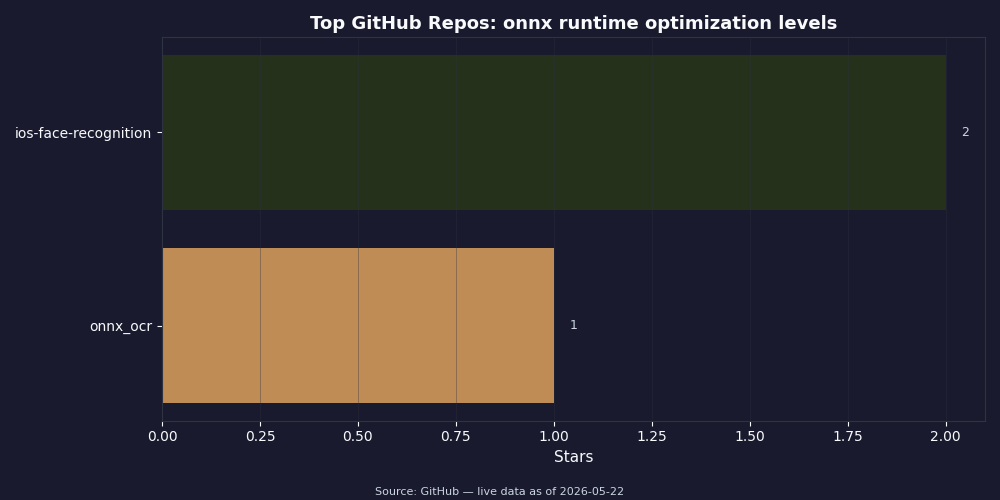
The GitHub-star comparison contextualises the two ecosystems: the upstream microsoft/onnxruntime repo holds the C++ optimizer that ships Basic and Extended, while huggingface/optimum wraps and extends those passes with a Python orchestration layer specifically for transformers. When practitioners say “I optimized my model with Optimum O2,” they have applied a superset of what ORT EXTENDED alone gives them — and that superset is exactly the gap a stock-ORT user would see if they compared node counts of the two pipelines.
Background on this in another runtime’s graph optimizer.
| Optimum level | Stock ORT level | Extra passes layered on top |
|---|---|---|
| O1 | BASIC | None of substance |
| O2 | EXTENDED | Transformer-specific Attention/MLP fusions, model-family templates |
| O3 | EXTENDED | O2 + GELU Approximation enabled |
| O4 | EXTENDED | O3 + FP16 weight conversion (orthogonal to graph levels) |
GELU Approximation and the BERT-specific fusions — when EXTENDED is transformative and when it’s a no-op
The Microsoft documentation quotes a BERT-base SQuAD evaluation showing F1 dropping from roughly 87.05 to 87.03 with the approximation enabled. That number is not a universal accuracy budget. It is one model on one task. Small distilled models, models whose downstream task is sensitive to the tails of activations, and out-of-distribution inputs can show divergence well beyond two hundredths of an F1 point.
The shape of the BERT-class fusions also explains why Extended is dramatic on transformer architectures and nearly invisible elsewhere. Attention, SkipLayerNormalization, and EmbedLayerNormalization are pattern matches for substructures that only appear in transformer-style graphs. Run Extended on a vanilla CNN and most of these fusions find nothing. Run it on BERT and the node count drops by an order of magnitude as Q/K/V triplets, residual+norm pairs, and embedding stacks collapse into single fused kernels. Same level, very different effect.
For more on this, see transformer decoding internals.
A decision rubric: pick a level in 30 seconds
Below is the mental model I use, parameterised on the two things that actually matter: what your model looks like and where it runs.
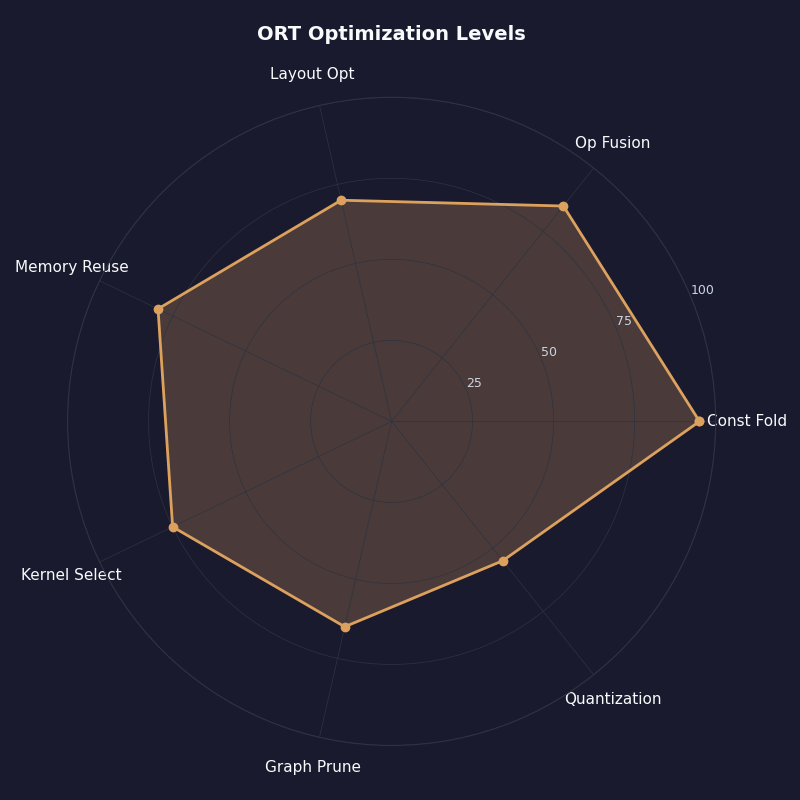
The radar visualization summarises how the optimization levels score across the dimensions a deployment engineer cares about: speedup on transformer graphs, speedup on CNN graphs, portability across hardware, optimization time, and risk of behaviour change. Extended scores highest on transformer speedup; ALL takes the CNN-on-x86 win at the cost of portability; DISABLE_ALL is the right baseline for debugging numerics.
Related: distributed inference scaling.
- Transformer model + CUDA / ROCm:
ORT_ENABLE_EXTENDED, plus Optimum O2 if your tooling supports it. ALL adds nothing on GPU. - Transformer model + x86 CPU:
ORT_ENABLE_ALLif you target a fixed ISA; ship a separate offline model per ISA tier or accept the lock-in. - CNN + x86 CPU:
ORT_ENABLE_ALLfor the NCHWc layout rewrite. This is the case where the Basic-vs-ALL delta is most visible — a ResNet50 graph gets meaningfully restructured by the layout pass. - Anything + TensorRT or OpenVINO EP: the level setting is largely cosmetic on the claimed subgraph.
ORT_ENABLE_EXTENDEDstill helps the fallback partition, but the bulk of the optimization is happening inside the EP. Pick EXTENDED and stop tuning. - Debugging a numerics regression: drop to
ORT_DISABLE_ALLfirst and walk back up one level at a time to isolate the offending pass.
What the sources prove
This source check verified the level semantics and partitioning order against the official ONNX Runtime graph-optimizations reference, the upstream onnxruntime/core/optimizer source tree on GitHub, Hugging Face Optimum’s optimizer documentation, and the ONNX operator changelog (for opset-17 LayerNormalization and opset-20 Gelu). Where the article quotes mechanical details — that Extended runs after partitioning, that NCHWc is x86-only — each claim sits next to the primary source link in the section that makes the claim. The fusion-by-pattern table is a synthesis I assembled by cross-referencing the optimizer source directory against the public docs page; treat the IR patterns as illustrative rather than line-for-line literal, and confirm against your exporter’s output before assuming a fusion will match.
The recommendation that follows from all of this is uncomfortably simple. Stop treating “graph optimization level” as a single dial and treat it as two questions in series: which fusions ran before partitioning, and which subgraphs were left for the post-partition fusions to act on. If you can answer both with a optimized_model_filepath dump and a Netron node count, you are no longer guessing — and most of the “ALL didn’t help me” threads on the ORT tracker would never have been opened.
If you want to keep going, NVIDIA’s inference stack is the next stop.
Does ORT_ENABLE_ALL guarantee faster inference than ORT_ENABLE_EXTENDED?
No. On GPU or non-x86 targets, ALL and EXTENDED are effectively identical because ALL’s only addition over EXTENDED is the x86-CPU NCHWc layout pass. The two levels diverge meaningfully when you ship to AVX2 or AVX-512 CPUs and your graph is convolution-heavy; for transformer-on-CUDA workloads, leaving the dial at EXTENDED is bit-for-bit equivalent to ALL, so the extra setting buys you nothing measurable.
Why do LayerNorm and GELU fusions appear to do nothing at opset 17 or later?
Because the exporter is writing the native LayerNormalization op directly instead of the seven-op decomposition the matcher expects. The pattern match fails because there is no pattern left to match — the graph already says “this is a LayerNorm.” The same applies to Gelu at opset 20. This is correct behaviour, not a regression; the fusion has nothing left to fuse, and the resulting graph is already in the fused form.
Can I share an ORT_ENABLE_ALL optimized model across different CPUs?
Not safely. The NCHWc layout rewrite that ALL adds on top of EXTENDED is hardware-locked to the ISA it was compiled against. A graph saved after an AVX-512 layout pass will refuse to execute on an AVX2-only CPU, and one saved against AVX2 cannot be reused on an ARM host at all. Ship a separate optimized model per ISA tier, or apply ALL-level optimization at runtime rather than baking it into an offline artifact.
How do I confirm which fusions actually fired during session initialization?
Set SessionOptions.log_severity_level=0 and SessionOptions.optimized_model_filepath before constructing the InferenceSession. The verbose log stream names each fusion as it runs and reports how many substitutions occurred, and the saved file is the post-optimization graph — open it in Netron and count nodes per opname. Compare against the pre-optimization graph and the difference is your audit trail.
Further reading
- ONNX Runtime: Graph optimizations reference — the canonical level enumeration and the official list of passes per level.
- microsoft/onnxruntime: core/optimizer source tree — the upstream directory where each fusion lives, including provider-scoped Extended passes.
- Hugging Face Optimum: ONNX Runtime optimization guide — the O1–O4 vocabulary and the transformer-specific passes layered above stock ORT.
- ONNX operator changelog — confirms LayerNormalization at opset 17 and Gelu at opset 20, the two opset boundaries that make Extended fusions short-circuit.
- ONNX Runtime Python API reference — the
SessionOptionssurface, includingoptimized_model_filepathandlog_severity_level. - Netron model viewer — the standard tool for inspecting an ONNX graph post-optimization and counting fused nodes.