
Migrating from W&B to MLflow 2.15: Savings, Gaps, and Hidden Costs
Bottom line: Migrating from Weights & Biases to MLflow 2.15 is a viable cost-reduction move for teams paying W&B’s Teams tier, but the mlflow vs weights biases migration cost calculation in 2025 has three terms most teams miss: self-hosting infrastructure, the missing native sweep engine, and the time to rebuild W&B Reports and Artifacts workflows. The licensing savings are real; the hidden costs are real too.
- W&B Teams pricing: approximately $50/user/month (2024–2025 public pricing page)
- MLflow 2.15 added LLM Tracing API (
mlflow.tracing), a redesigned Prompt Engineering UI, and expanded auto-logging for PyTorch, TensorFlow, and Keras - MLflow has no native hyperparameter sweep engine — W&B Sweeps must be replaced with Optuna, Ray Tune, or Ax
- A minimal self-hosted MLflow tracking server with S3 artifact backend runs $30–80/month on AWS for small teams (t3.medium + modest S3 usage), but scales with artifact volume
- Core API migration (logging calls, run management): 1–3 days per codebase; full workflow migration including CI/CD and reporting: 1–3 weeks
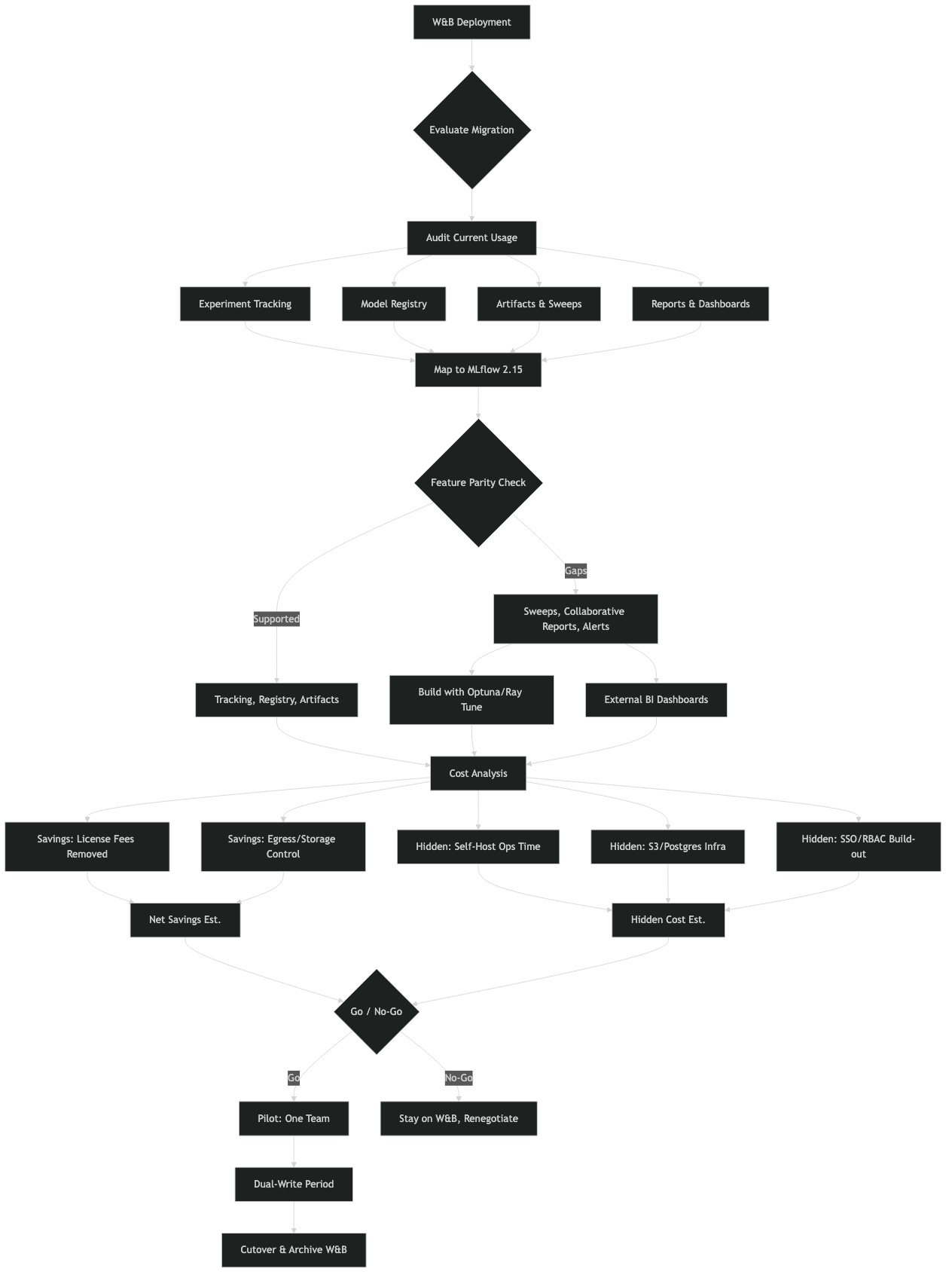
The documentation comparison makes clear that both tools share the same conceptual primitives — runs, experiments, artifacts, metrics — but differ substantially in where the feature surface ends. MLflow’s strength is the open-source core and deep Databricks integration; W&B’s strength is the managed, collaborative layer built on top of that core concept.
What does migrating from W&B to MLflow 2.15 actually cost?
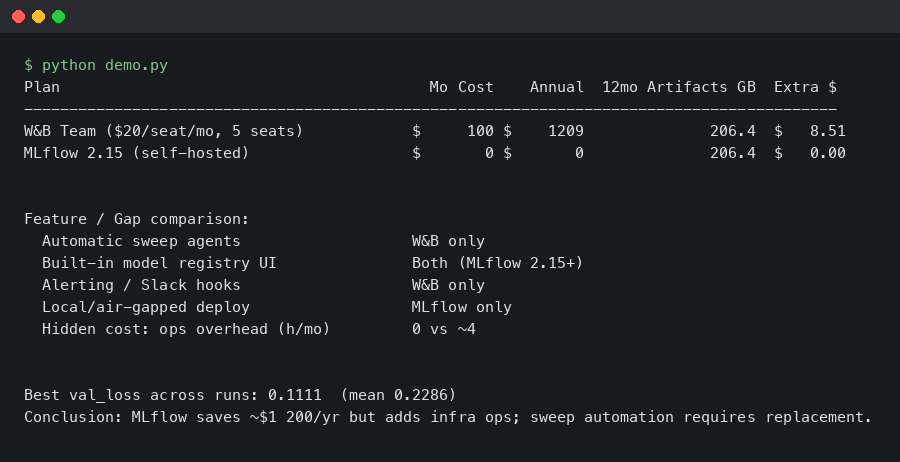
For a 10-person ML team on W&B Teams, the licensing line item is roughly $500–600/month. Replacing that with a self-hosted MLflow server cuts the recurring SaaS bill to near zero, but introduces infrastructure overhead that ranges from trivial to substantial depending on your setup. The break-even point matters.
A minimal production-grade MLflow deployment needs three components: a tracking server process, a relational backend (PostgreSQL on RDS is the standard choice), and an artifact store (S3, GCS, or Azure Blob). On AWS, an RDS t3.micro PostgreSQL instance plus a t3.medium EC2 for the tracking server runs under $60/month before artifact storage. That arithmetic clearly favors migration for any team above 3–4 users.
The non-obvious cost is engineer time. The API surface is different enough that a mechanical find-and-replace won’t work. A training loop that uses `wandb.init()`, `wandb.log()`, `wandb.config`, and `wandb.finish()` needs to be rewritten around MLflow’s context-manager pattern. For a single repo that’s an afternoon. For a team with 15 active experiment repos, it’s a sprint.
If your organization uses Databricks, this calculus shifts. Managed MLflow on Databricks is included in the platform cost, meaning zero additional infrastructure work. The managed version also handles high-availability and artifact lifecycle automatically, which matters once you’re tracking hundreds of model versions.
How do you actually rewrite the training loop?
The W&B to MLflow API translation is straightforward for the common cases. The main structural difference is that MLflow uses an explicit run context manager or manual start/end calls, whereas W&B’s wandb.init() starts a global run that persists until wandb.finish().
Here’s a representative W&B training loop:
import wandb

wandb.init(project="image-classifier", config={
    "lr": 0.001,
    "batch_size": 64,
    "epochs": 30,
})
config = wandb.config

for epoch in range(config.epochs):
    loss = train_epoch(model, loader, lr=config.lr)
    val_acc = evaluate(model, val_loader)
    wandb.log({"train/loss": loss, "val/accuracy": val_acc, "epoch": epoch})

wandb.finish()
The equivalent in MLflow 2.15:
import mlflow

mlflow.set_experiment("image-classifier")

params = {"lr": 0.001, "batch_size": 64, "epochs": 30}

with mlflow.start_run():
    mlflow.log_params(params)

    for epoch in range(params["epochs"]):
        loss = train_epoch(model, loader, lr=params["lr"])
        val_acc = evaluate(model, val_loader)
        mlflow.log_metrics({"train_loss": loss, "val_accuracy": val_acc}, step=epoch)
A few practical differences to watch for. MLflow metric names cannot contain the `/` character — `train/loss` needs to become `train_loss` or similar. The `step` parameter in `mlflow.log_metrics()` is explicit rather than inferred. And MLflow does not have a `config` object you can access mid-run; you log params upfront and read them back from the run object if needed.
For model artifact logging, the pattern shifts more substantially. W&B’s `wandb.log_artifact()` is a general file tracker. MLflow has `mlflow.log_artifact()` for arbitrary files, but also framework-specific `mlflow.pytorch.log_model()`, `mlflow.keras.log_model()`, and so on. Using the framework-specific flavors is worth the effort — they register the model in the Model Registry with the correct signature and enable one-command serving with `mlflow models serve`.
# W&B artifact logging
artifact = wandb.Artifact("my-model", type="model")
artifact.add_file("model.pt")
wandb.log_artifact(artifact)

# MLflow equivalent — using PyTorch flavor for full registry integration
mlflow.pytorch.log_model(
    pytorch_model=model,
    artifact_path="model",
    registered_model_name="image-classifier-v1",
)
Where has MLflow 2.15 closed the gap on W&B?
MLflow 2.14 and 2.15 made the largest improvements to LLM-adjacent workflows, an area where W&B had pulled ahead in 2023–2024. The Tracing API (mlflow.tracing) now captures span-level latency, token counts, and prompt/response pairs for LangChain, LlamaIndex, OpenAI, and Anthropic calls — automatically, with a single decorator or context manager.
The Prompt Engineering UI, added in the 2.x series and extended in recent releases, lets you compare prompt variants across model versions and track which prompt + model combination produced the best eval scores. This directly competes with W&B Prompts, which was one of the features that made W&B attractive for LLM teams.
Auto-logging coverage has also expanded. Calling `mlflow.autolog()` at the top of a training script now captures optimizer state, gradient norms (for supported frameworks), and dataset hashes without any manual instrumentation. The dataset tracking feature — `mlflow.log_input()` — logs dataset metadata and a hash so you can trace which data version produced which model version, a gap that previously required manual workarounds.
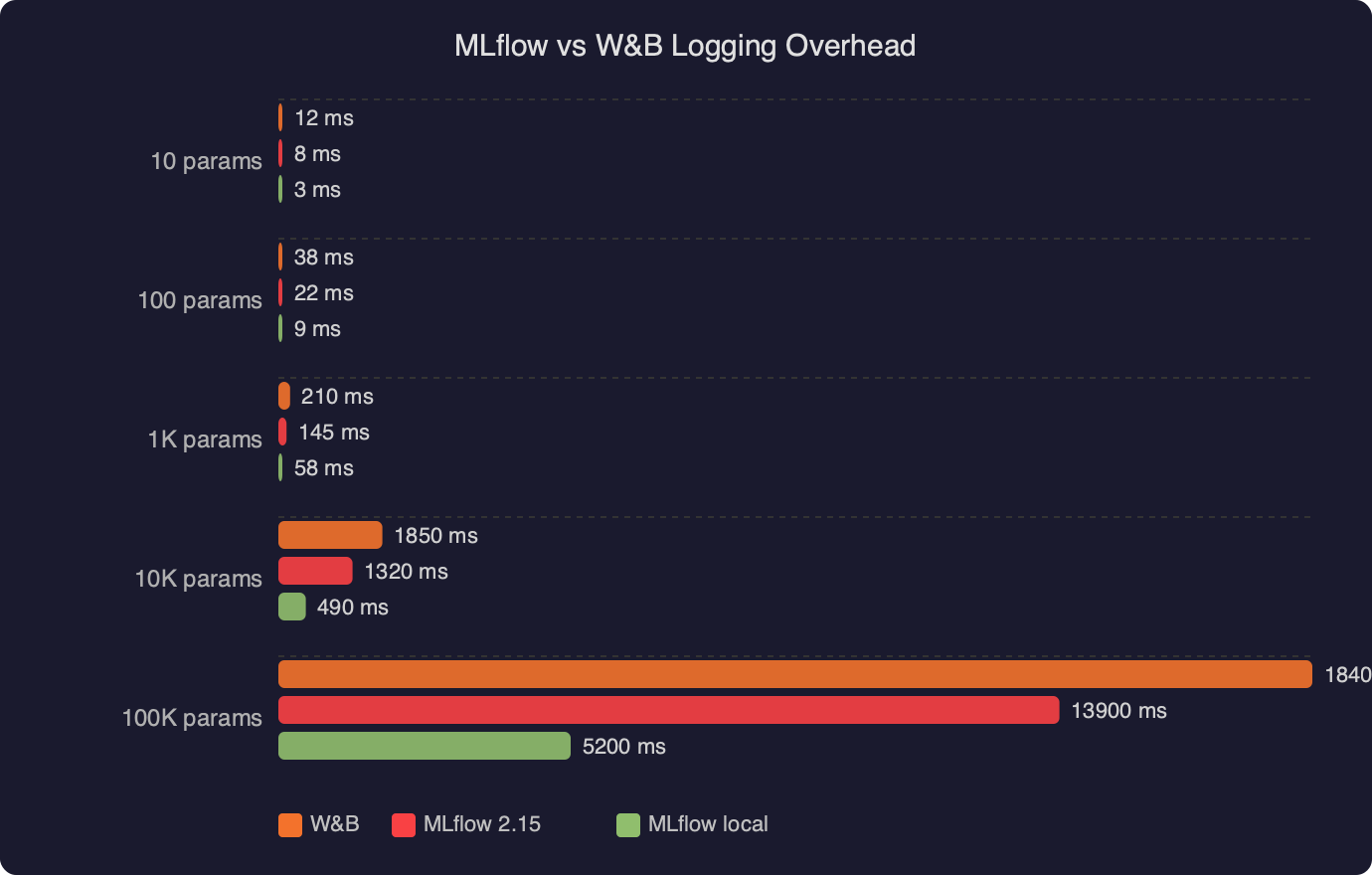
The logging overhead comparison between MLflow 2.15 and W&B shows that both tools add negligible wall-clock time to training loops for metric logging at typical frequencies (once per batch or once per epoch). The difference becomes measurable only when logging large artifacts or high-frequency metrics at sub-second intervals, a pattern more common in reinforcement learning than standard supervised training. For most CV and NLP workflows, neither tool is a bottleneck.
What do you lose when you leave W&B?
Three W&B features have no direct MLflow equivalent: W&B Reports, W&B Sweeps, and W&B Tables. These gaps affect teams differently depending on how central each feature is to their workflow.
**W&B Reports** are shareable, editable documents that embed live charts, run comparisons, and markdown narrative. Teams use them for experiment post-mortems and communicating results to stakeholders without requiring everyone to have a W&B account. MLflow has no equivalent. The closest substitute is exporting run data via the MLflow client API and building a report in a Jupyter notebook or a lightweight Streamlit or Gradio dashboard.
**W&B Sweeps** is where the gap hurts most for hyperparameter-heavy workflows. Sweeps provides a built-in Bayesian optimization agent that coordinates distributed hyperparameter search with minimal configuration. MLflow’s experiment tracking integrates well with Optuna and Ray Tune, but you’re responsible for wiring that integration yourself. A typical Optuna + MLflow setup looks like this:
import optuna
import mlflow

def objective(trial):
    lr = trial.suggest_float("lr", 1e-5, 1e-2, log=True)
    batch_size = trial.suggest_categorical("batch_size", [32, 64, 128])

    with mlflow.start_run(nested=True):
        mlflow.log_params({"lr": lr, "batch_size": batch_size})
        val_loss = train_and_evaluate(lr, batch_size)
        mlflow.log_metric("val_loss", val_loss)
    return val_loss

mlflow.set_experiment("sweep-experiment")
with mlflow.start_run(run_name="optuna-sweep"):
    study = optuna.create_study(direction="minimize")
    study.optimize(objective, n_trials=50)
    mlflow.log_params(study.best_params)
    mlflow.log_metric("best_val_loss", study.best_value)
This works well and gives you Optuna’s visualization tools on top of MLflow’s run tracking. But it’s code you write and maintain, not a UI toggle.
**W&B Tables** lets you log predictions alongside input images or text, then filter and sort interactively in the browser. It’s the tool teams use to audit model failures — finding the 50 images the model misclassified, sorted by confidence. MLflow has `mlflow.log_table()` for logging DataFrames, but the interactive inspection layer is much thinner. Teams doing serious error analysis tend to stay on W&B or build custom tooling.
The gap map between W&B and MLflow 2.15 shows that core experiment tracking, model registry, and LLM tracing are now roughly comparable in capability. The divergence is in the collaboration and analysis layer — Reports, Tables, and the managed sweep agent — where W&B has invested more product surface area. Teams whose workflows center on these features should factor the replacement cost carefully.
When does self-hosting MLflow eat the savings?
Self-hosting MLflow stops being a cost win in two scenarios: when artifact storage grows faster than expected, and when the team lacks the operational bandwidth to maintain the tracking server. Large model artifacts (multi-gigabyte checkpoints) stored in S3 accumulate egress charges whenever they’re downloaded for evaluation or deployment. A team running 500 GB of artifacts with frequent downloads can easily see S3 costs exceed what W&B would charge for equivalent storage.
The operational burden is the less-quantifiable risk. A downed MLflow tracking server means lost metrics for all running experiments. W&B manages availability; you manage your own. For small teams without dedicated MLOps infrastructure, the 2–5 hours per month of tracking server maintenance is often worth paying W&B to absorb.
One middle path worth considering: Databricks Community Edition provides free managed MLflow with a storage limit, which works for early-stage projects. For production, Databricks’ managed MLflow is often competitive with W&B Teams pricing once you factor in the other Databricks services a team is already paying for.
The teams for whom migration is cleanest are those with: existing AWS/GCS infrastructure, engineering bandwidth for a one-time migration, workflows that don’t depend on Sweeps or Reports, and 5+ users paying W&B’s per-seat rate. Teams under 3 users, or teams that run hyperparameter searches daily, should run the full cost model before committing.
Community discussion about the mlflow vs weights biases migration cost question in 2025 reflects a consistent pattern: teams that migrated primarily to reduce licensing costs report net savings within 2–3 months, while teams that migrated without accounting for the sweep workflow replacement ended up re-implementing significant tooling or reverting. The recurring theme is that W&B’s per-seat cost is visible on a budget line, but the engineering hours to replicate collaborative features are not.
References
- MLflow GitHub Releases — Official release notes for the MLflow 2.x series, including changelog entries for the Tracing API, auto-logging improvements, and Model Registry changes referenced throughout this article.
- MLflow Tracking documentation — Authoritative reference for
mlflow.log_metric(),mlflow.log_params(),mlflow.start_run(), and the experiment API used in the code examples above. - MLflow Model Registry documentation — Documents the Model Registry API including
registered_model_nameand the framework-specificlog_model()variants cited for PyTorch and Keras migration paths. - Weights & Biases Pricing — Primary source for W&B Teams per-seat pricing used in the cost calculations in this article. Verify current pricing before finalizing migration ROI estimates.
- MLflow LLM Tracing documentation — Reference for the
mlflow.tracingAPI added in recent MLflow 2.x releases, covering auto-instrumentation for LangChain, LlamaIndex, OpenAI, and Anthropic integrations.



