
Gradio annotation tool limits: what breaks in production
Gradio annotation tool limits show up when labels become production training data, not when a demo screen first renders. Gradio’s AnnotatedImage is display-oriented, State is interaction state, and resource cleanup can remove temporary app artifacts. A real labeling operation needs durable storage, item IDs, annotator IDs, assignment rules, review status, timestamps, label versions, conflict handling, and reproducible exports; without those, a polished Blocks UI can still produce labels that cannot be audited or trusted.
- Good fit: demos, visual inspection, and single-reviewer loops where labels are not authoritative records.
- Break point: multi-annotator queues, reviewer approvals, schema changes, and training exports.
- Production requirement: database-backed labels with identity, status, versions, timestamps, and provenance.
At first glance, a Gradio annotation tool looks like a fast path from image UI to training labels, but its display-first components and session-oriented state change the operational risk. Gradio is fine for showing annotations and risky as the source of truth for an annotation operation: the core gradio annotation tool limits are persistence, identity, assignment, review, locking, audit trails, and reproducible exports that Gradio leaves to the application builder.
More on Gradio Annotation Tool Limits.
In this post
- Why the Gradio annotation limit is architectural, not cosmetic
- AnnotatedImage displays labels; it does not run a labeling operation
- The first failure: annotation state that disappears, drifts, or lives in the wrong place
- The second failure: two annotators, one item, no workflow contract
- The third failure: exports without provenance are not training data you can trust
- When Gradio is still the right choice
- The operational annotation checklist Gradio does not replace
- What the sources prove
- The strongest counter-argument
- References
- Use Gradio for demos, visual inspection, and small internal review loops; do not let it own production label truth.
- Gradio’s official AnnotatedImage docs describe a display-oriented component, not a labeling workflow manager.
- Temporary files, browser sessions, and in-memory state are not acceptable storage for training labels; Gradio’s Resource Cleanup guide is explicit that app resources may need cleanup, and Gradio’s State component docs frame state as part of the app interaction flow rather than as durable data storage.
- A production annotation tool needs item identity, annotator identity, review status, timestamps, label versions, and export provenance; the W3C PROV overview is useful authority for why provenance exists as a first-class data concern.
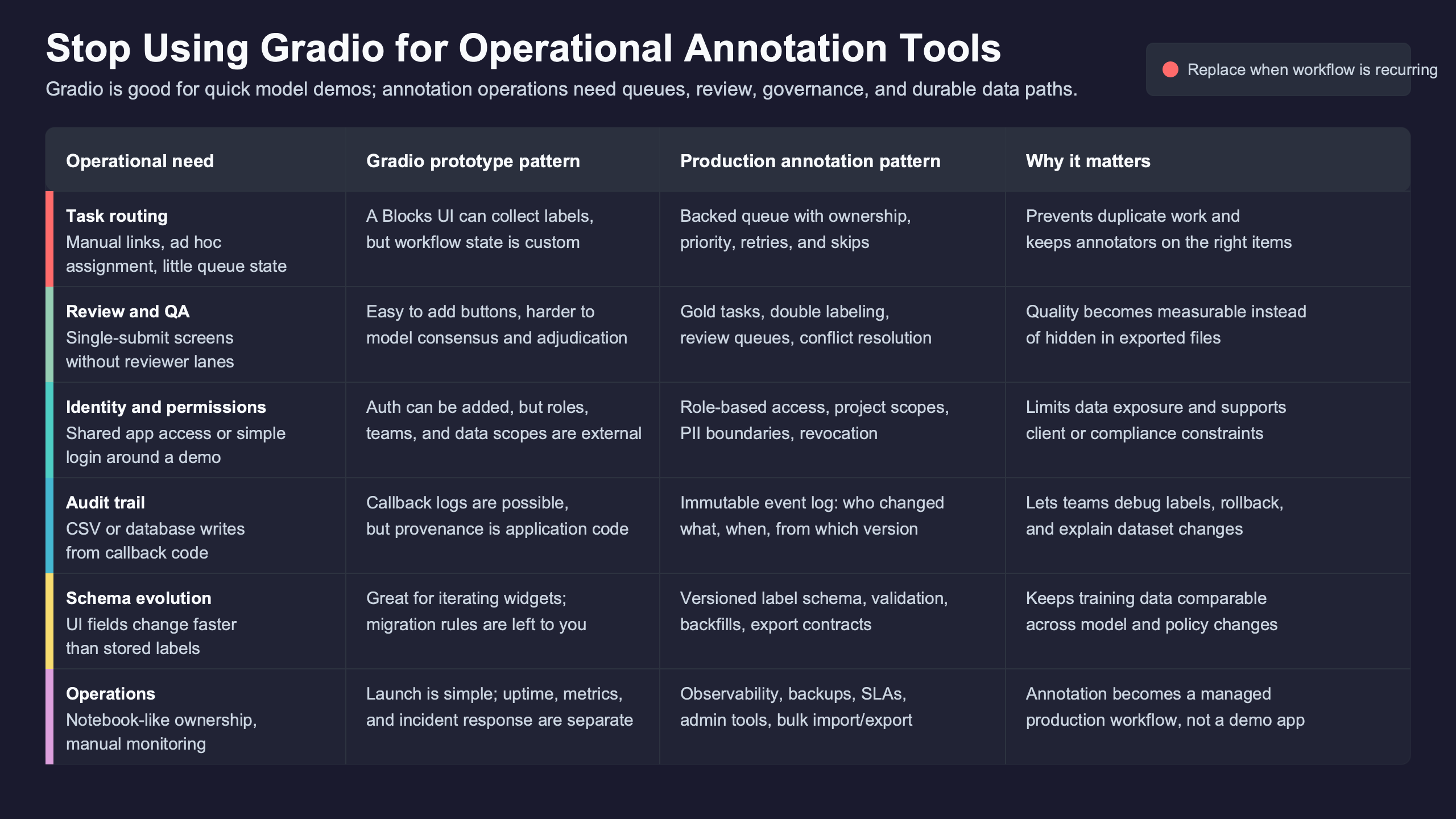
Why the Gradio annotation limit is architectural, not cosmetic
The failure mode starts when a prototype annotation screen is treated as a data system. Gradio gives you a fast interface layer, but operational annotation needs a backend that owns work queues, record identity, reviewer decisions, and export history.
The distinction matters because annotation data usually moves downstream into fine-tuning, evaluation, retrieval testing, or model regression suites. A label that looks correct on screen is not enough. You need to know who created it, which item it belongs to, whether it was reviewed, what schema version produced it, and which export included it. That is not just process preference: the W3C PROV overview treats provenance as information about the entities, activities, and people involved in producing data, which is exactly the missing layer in many annotation prototypes.
Background on this in filter-selective retrieval.
The practical rule is simple: if losing the running Gradio process would make you unsure which labels are final, the system is not operational. It is a demo with annotation-shaped UI.
That does not make Gradio a bad tool. It makes it a boundary. For a single reviewer checking model outputs, Gradio can be ideal. For a queue of labeling tasks feeding PyTorch, TensorFlow, Hugging Face Transformers, or JAX training jobs, Gradio should sit above a database, not replace one.
AnnotatedImage displays labels; it does not run a labeling operation
Gradio’s own component model makes the boundary visible. The official AnnotatedImage page describes a component for displaying annotations over an image, and notes that it is rarely used as input because it does not accept user input.
That single fact answers much of the “gradio annotation tool limits” question. If humans need to draw, edit, correct, reject, or approve labels, AnnotatedImage is already the wrong primitive for the work. Constructor parameters can affect how the overlay appears, but they do not create an annotation operation.
A minimal display example looks like this:
import gradio as gr

image = "sample.jpg"

boxes = [
    ((40, 35, 180, 140), "defect"),
    ((210, 90, 330, 210), "serial_number"),
]

with gr.Blocks() as demo:
    gr.Markdown("Review existing annotations")
    gr.AnnotatedImage(value=(image, boxes))

demo.launch()
This is useful for inspection. It shows the base image and two labeled regions. What it does not do is assign the image to an annotator, capture a newly drawn box, save an edit history, prevent a second user from overwriting the first user, or mark the item as reviewed.
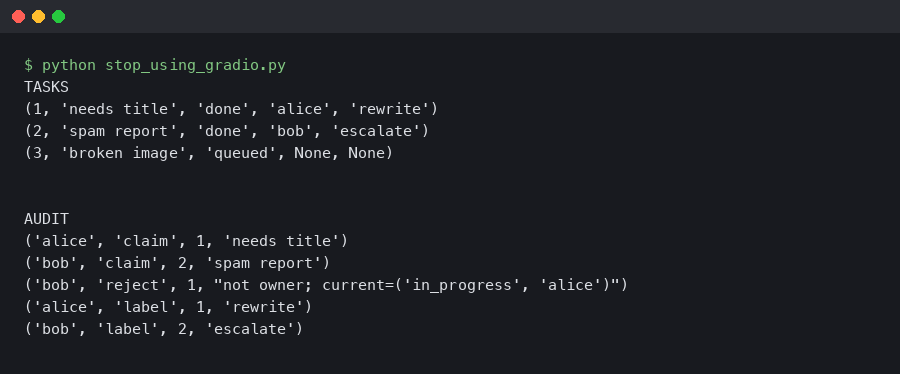
Output captured from a live run.
The misleading part is that a labeling screen can look operational before it has any operational guarantees.
For comparison, Streamlit’s Session State docs explicitly frame session state as per-user session data, while FastAPI’s SQL database tutorial shows the separate persistence layer pattern common in production web services. Different tools, same lesson: UI state and durable records are different things.
The first failure: annotation state that disappears, drifts, or lives in the wrong place
The first operational failure is treating cache, uploads, browser sessions, or Python variables as annotation storage. Those places are acceptable for interaction state; they are not acceptable for labels that will become training data.
Gradio’s Resource Cleanup guide explains that apps can create RAM and disk resources and that cleanup is needed to prevent servers from being overwhelmed. That is good engineering for demos and apps that handle generated files. It is also a warning for annotation systems: files subject to cleanup should not be your record of truth.
Consider this illustrative mockup:
import gradio as gr

def save_label(current_state, label):
    current_state = current_state or []
    current_state.append({"label": label})
    return current_state, current_state

with gr.Blocks(delete_cache=(60, 60)) as demo:
    label_state = gr.State([])
    label = gr.Textbox(label="Label")
    submit = gr.Button("Save")
    output = gr.JSON(label="Current labels")
    submit.click(save_label, [label_state, label], [label_state, output])

demo.launch()
This can feel convincing during a review session. The JSON updates, the UI responds, and the annotator sees their work. Yet the label list is session state, not a dataset record with identity and provenance. If the process restarts, if the browser closes, or if temporary files are cleaned up, the application needs a separate persistence path to recover authoritative state.
Gradio’s State component docs describe state as a way to store values in the app interaction flow. That is not the same as a database row with constraints, timestamps, ownership, and export membership.
The second failure: two annotators, one item, no workflow contract
The second failure appears when two people touch the same task. Gradio can serve multiple users, but it does not define an annotation workflow contract: assignment, locks, reviewer queues, conflict handling, and final-state rules are application responsibilities.
Imagine two browser sessions opening the same image. Annotator A marks a defect as “scratch.” Annotator B marks the same region as “shadow.” If both submit to a shared JSON file or an in-memory object, the final label may simply be whichever write happened last. That is not review; it is accidental overwrite.
There is a longer treatment in SageMaker deployment workflows.
A real annotation backend needs to decide what happens before the conflict occurs. The minimum shape is closer to this SQLite-backed table than to a UI component:
CREATE TABLE annotations (
    item_id TEXT NOT NULL,
    annotator_id TEXT NOT NULL,
    label_json TEXT NOT NULL,
    status TEXT NOT NULL,
    updated_at TEXT NOT NULL,
    reviewer_id TEXT,
    label_version INTEGER NOT NULL,
    PRIMARY KEY (item_id, annotator_id, label_version)
);
This schema is intentionally small. It still captures concepts Gradio does not provide by itself: item identity, annotator identity, mutable status, update time, reviewer ownership, and label version. A production system would likely add constraints, task assignment tables, dataset export tables, and project-level schemas.
This is where many Gradio annotation prototypes break. The first useful version often handles “show image, accept label, save JSON.” The operational version needs “assign item, authenticate annotator, save versioned label, route to reviewer, preserve rejected labels, export approved snapshot.” Those are different systems.
The third failure: exports without provenance are not training data you can trust
The third failure is downstream. A JSON file full of boxes may be syntactically valid, but without provenance it is weak training data: you cannot explain its origin, reproduce its export, or separate reviewed labels from provisional ones.
For machine learning teams, export quality is not clerical. A mislabeled image can affect a fine-tuning run. A changed taxonomy can invalidate evaluation comparisons. A reviewer decision can explain why one dataset snapshot should be trusted and another should be discarded. The NIST AI Risk Management Framework emphasizes governance and documentation for managing AI risk; in annotation pipelines, provenance-rich exports are one practical way to make those governance claims testable.
There is a longer treatment in experiment tracking.
A Gradio-only mock often exports records like this:
[
  {
    "image": "sample.jpg",
    "boxes": [
      {"x1": 40, "y1": 35, "x2": 180, "y2": 140, "label": "defect"}
    ]
  }
]
A safer export carries provenance:
[
  {
    "image_id": "img_00042",
    "source_uri": "s3://dataset/raw/img_00042.jpg",
    "label_version": 3,
    "annotator_id": "ann_17",
    "reviewer_id": "rev_04",
    "status": "approved",
    "updated_at": "2026-05-23T09:20:00Z",
    "schema_version": "damage-v2",
    "source_app_version": "annotation-ui-2026-05",
    "boxes": [
      {"x1": 40, "y1": 35, "x2": 180, "y2": 140, "label": "defect"}
    ]
  }
]
The second file is more verbose because it answers operational questions. Which schema was used? Was the label reviewed? Which application version emitted the export? Can the training job be rerun against the same approved snapshot?
MLflow’s tracking documentation is useful context here because it treats experiments, parameters, metrics, and artifacts as records to preserve. Annotation exports deserve similar discipline: not the same schema, but the same respect for reproducibility.
When Gradio is still the right choice
Gradio remains a good choice when the annotation task is actually inspection, demonstration, or lightweight review. The rule is not “never use Gradio.” The rule is “do not let Gradio be the authoritative annotation backend.”
Gradio is a practical fit when a model team needs to look at outputs quickly: compare detections, inspect segmentation masks, review retrieval examples, or collect rough feedback from a small group. In those cases, the cost of building a full workflow system may be higher than the value of the labels.
I wrote about image API deployment if you want to dig deeper.
Gradio also makes sense as a frontend above a real backend. Put FastAPI, Django, Flask, or another service behind it. Store labels in PostgreSQL, SQLite, Snowflake, or an application database. Use object storage for images. Give every item a durable ID. Then treat Gradio as an interface, not the source of truth.
This pattern also keeps the toolchain flexible. The same records can feed PyTorch dataloaders, TensorFlow pipelines, Hugging Face datasets, Spark jobs, or vector database evaluation flows in Milvus, Pinecone, Weaviate, Chroma, Qdrant, or FAISS-based systems.
The operational annotation checklist Gradio does not replace
A production annotation tool needs a checklist that lives below the UI. If any item on this list is missing, the Gradio app may still be useful, but it should not be trusted as the operational annotation system. This is an editorial rubric, but it follows directly from Gradio’s own component boundaries and cleanup/state documentation, plus the broader provenance expectation described by W3C PROV.
- Persistence: labels are saved in a database or durable object store, not only in session state, temporary files, or local process memory.
- Identity: each item, annotator, reviewer, project, and label schema has a stable identifier.
- Assignment: the system knows who is allowed to work on which item and whether the item is open, submitted, rejected, or approved.
- Conflict control: two users cannot silently overwrite each other’s work without a recorded decision.
- Review: reviewer actions are separate from annotator actions and leave a record.
- Versioning: label schemas and label records can change without erasing prior decisions.
- Export provenance: training exports include enough metadata to reproduce the dataset snapshot.
If the checklist sounds heavier than the prototype, that is the point. Annotation operations are data governance systems with a UI attached. Gradio can supply part of that UI, but it does not erase the need for the system underneath.
evaluation traces goes into the specifics of this.
What the sources prove
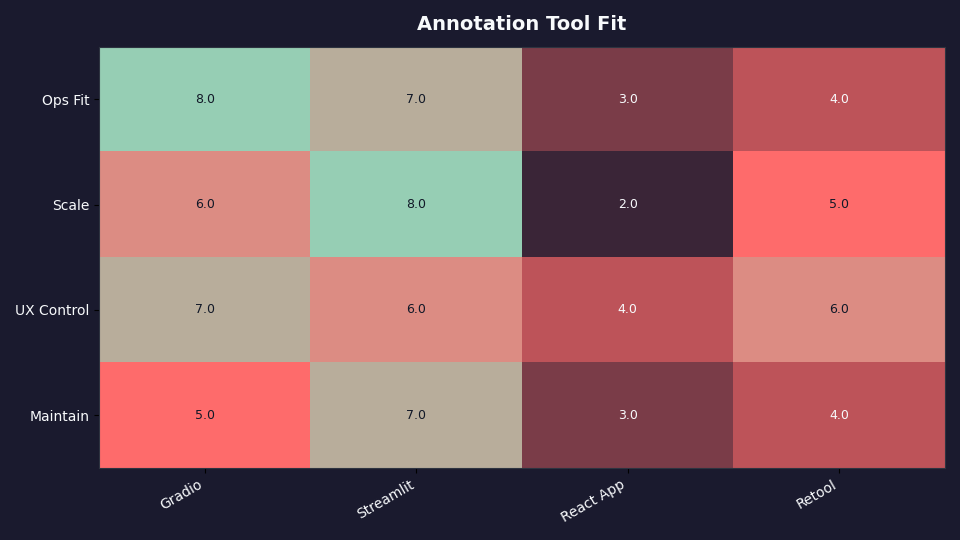
The cited sources frame Gradio’s AnnotatedImage behavior, Gradio’s cleanup guidance, Gradio State semantics, Streamlit session-state framing, FastAPI’s database-backed web pattern, MLflow’s tracking model, W3C’s provenance model, and NIST’s AI risk-management framing. The comparison dimensions were display capability, session state, cleanup risk, persistence ownership, workflow control, and export provenance.
The limitation of this check is that Gradio can be extended with custom components and external services. That does not change the recommendation. Once you add durable storage, assignment, review, and exports, Gradio is no longer the annotation system; it is the frontend to one.
The strongest counter-argument
The strongest objection is that Gradio can run arbitrary Python, so a team can add a database, authentication, queues, and exports around it. That is true. It is also the rebuttal: the production value comes from the layer you added, not from the annotation component itself.
If your team already has that layer, Gradio may be a practical internal interface. If your team does not, Gradio will not quietly provide it. The dangerous version is the middle ground: a polished Blocks app, some JSON files, temporary uploads, and no clear owner for final labels.
Stop using Gradio as the default for operational annotation tools. Use it to inspect models, build fast review screens, and test workflows. When labels become training data, put the durable annotation system first and let Gradio sit on top only if it still fits the workflow.
Continue with Azure ML security.
References