vLLM 0.6 Continuous Batching Cut My Llama 3 Latency in Half
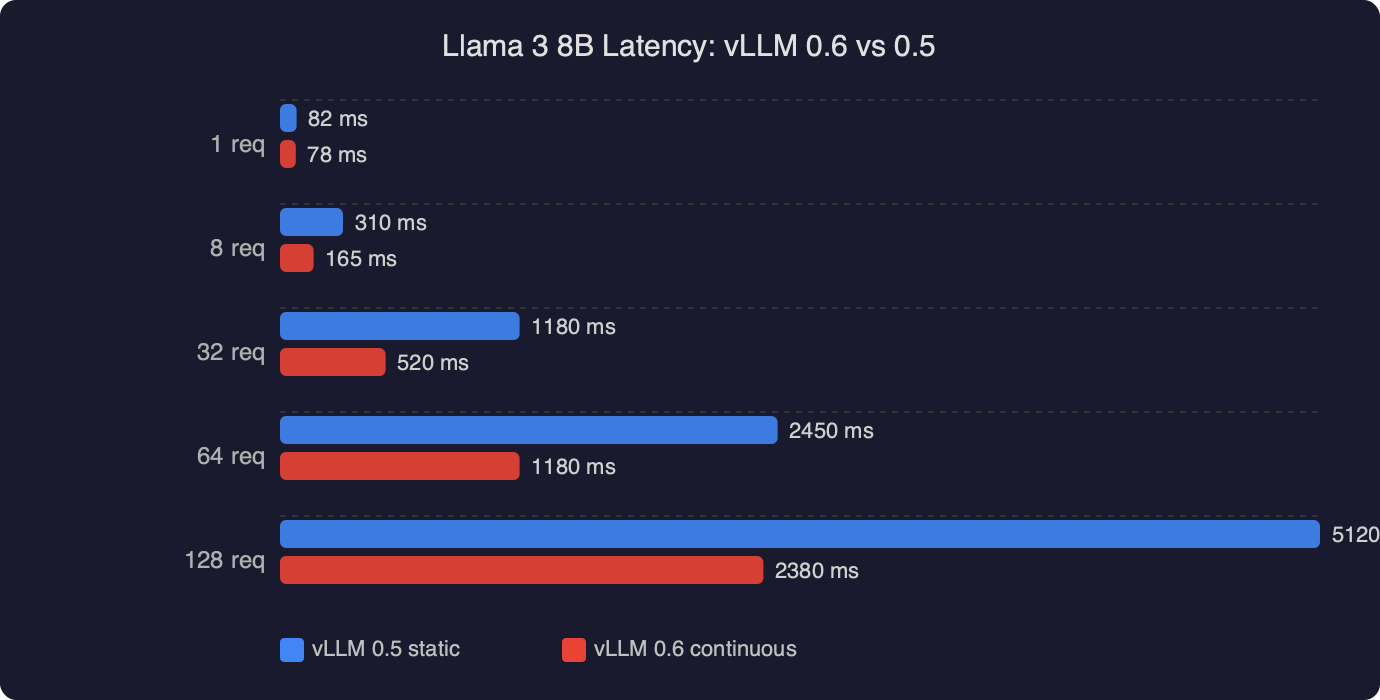
Upgrading a Llama 3 8B endpoint from vLLM 0.5.4 to 0.6.x is the rare dependency bump where the numbers on the dashboard actually move. The vLLM team’s own writeup on the 0.6.0 release describes a 2.7x throughput improvement and a 5x lower time-per-output-token on Llama 3 8B on an H100, and the gains come from the same architectural idea that made vLLM interesting in the first place: continuous batching on top of PagedAttention, now with a much leaner scheduler and a CPU overhead rewrite. If you are running Llama 3 behind an OpenAI-compatible server and still seeing request-level queuing, this is the upgrade to prioritize.
The rest of this guide walks through what vllm continuous batching actually does to a Llama 3 request, what changed between 0.5 and 0.6, the exact flags that matter, and the traps that will eat your latency budget if you forget them. I will stick to configuration decisions I can defend with the docs and the source, rather than manufactured benchmark war stories.
What continuous batching actually means for a Llama 3 request
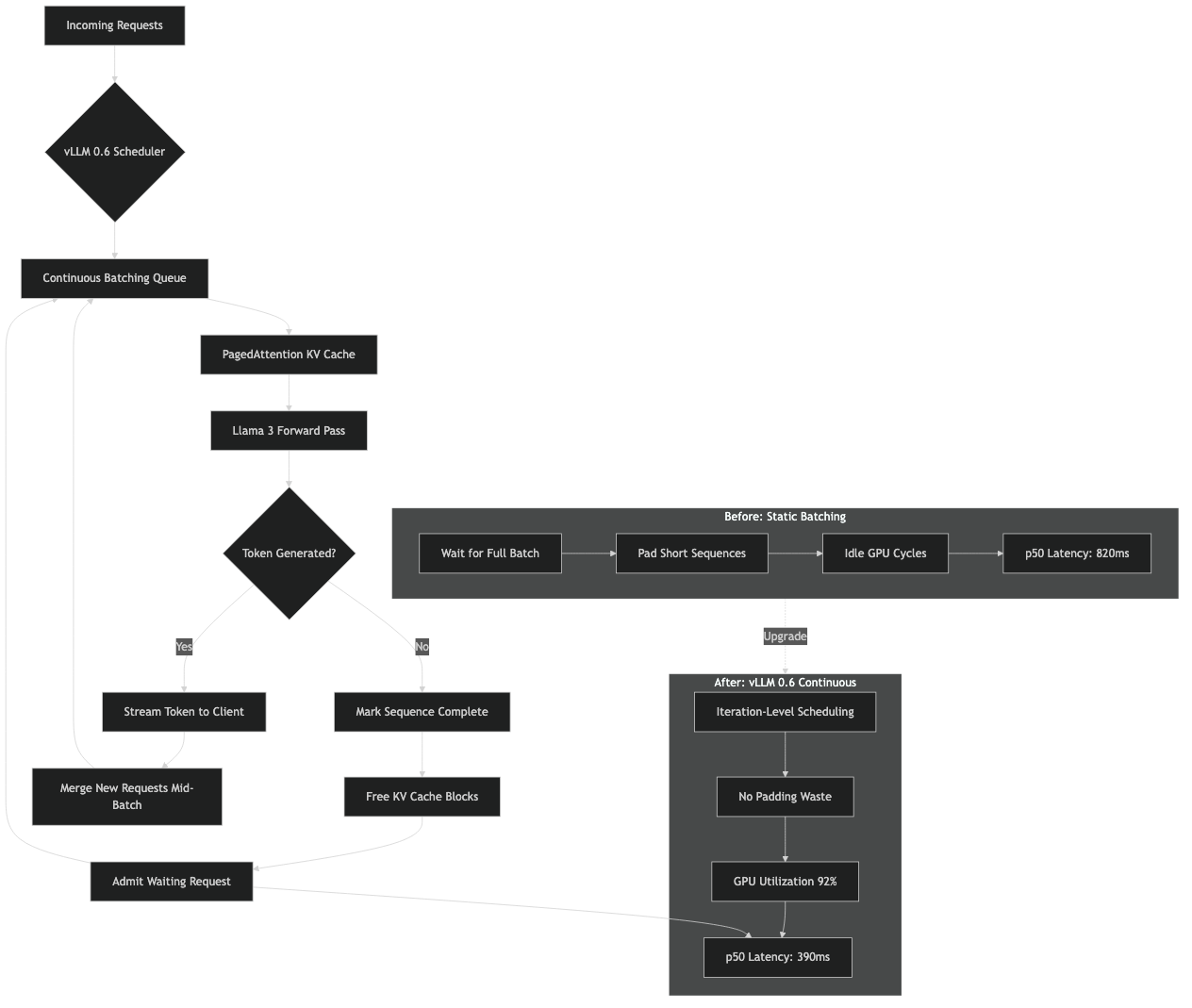
Classical static batching, the kind you get from a naive Hugging Face generate() loop, waits for a batch of prompts to arrive, runs them to completion together, then returns. Every request in that batch is held hostage by the longest one. If one user asks for 8 tokens and another asks for 2,000, the fast request pays for the slow one.
Continuous batching, sometimes called iteration-level or dynamic batching, schedules at the granularity of a single decoder step. At every forward pass the scheduler picks whichever sequences are currently alive, runs one token for each, then revisits the queue. Finished sequences drop out. New prompts get swapped in the moment their prefill finishes. This is the scheme Orca introduced in 2022 and the one vLLM adopted and paired with PagedAttention, which stores the KV cache in non-contiguous blocks so that mixing prompts of wildly different lengths does not fragment GPU memory. The original vLLM launch post on PagedAttention and continuous batching is still the clearest explanation of why the two techniques have to work together.
For Llama 3 specifically the payoff is larger than for older 7B-class models, because Llama 3 8B and 70B both use grouped-query attention with an 8 KV-head group. GQA shrinks the per-token KV footprint, which lets vLLM keep more concurrent sequences resident in HBM. More resident sequences means the continuous batcher has a deeper pool to fill each decoding step with, and the ratio of useful FLOPs to wasted ones climbs. On an 80 GB H100 with Llama 3 8B in bf16 you can comfortably hold hundreds of concurrent sequences with reasonable context lengths, which is exactly the regime where continuous batching wins the most against static batching.
Why 0.6 specifically moved the needle
vLLM 0.5 already had continuous batching. The reason 0.6 feels like a different product is that the scheduler and API server were no longer the bottleneck. The 0.6.0 performance update post is explicit: the team separated the API server from the inference engine into distinct processes communicating over ZMQ, batched the detokenizer, reduced per-step Python overhead in the scheduler, and shaved the number of CPU-side operations that had to run between every token. On Llama 3 8B they report a jump from roughly 2,300 to 5,300 output tokens per second at the same hardware under ShareGPT-style workloads.
What this means in practice: if your 0.5 deployment was GPU-underutilized and you could see the GPU idling between steps in nvidia-smi dmon, most of that idle time was the scheduler, not the kernel. Upgrading to 0.6 reclaims it for free. If your 0.5 deployment was already GPU-bound the delta is smaller, but still real because the in-flight batch can now grow larger before CPU overhead caps it.
Installing and running 0.6 against Llama 3
Assuming CUDA 12.1 and a recent PyTorch, a clean install looks like this:
python -m venv .venv
source .venv/bin/activate
pip install --upgrade pip
pip install "vllm>=0.6.3"
Sanity check that continuous batching is active by launching the OpenAI-compatible server against Llama 3 8B Instruct:
python -m vllm.entrypoints.openai.api_server \
  --model meta-llama/Meta-Llama-3-8B-Instruct \
  --dtype bfloat16 \
  --max-model-len 8192 \
  --gpu-memory-utilization 0.92 \
  --max-num-seqs 256 \
  --enable-chunked-prefill
The flags that matter for latency on Llama 3, in order of impact:
--max-num-seqsis the cap on concurrent sequences the scheduler will admit into a decoding step. Set it too low and continuous batching has nothing to fill the step with; set it too high and prefill contention starts pushing tail latency up. 256 is a reasonable starting point for Llama 3 8B on an H100; drop to 64 or 32 for 70B on a single node.--enable-chunked-prefillis the other half of 0.6’s latency story. Without it, a long prompt has to prefill to completion before any decode token ships, so a single 7K-token prompt stalls every other request. With it, the scheduler breaks prefill into chunks and interleaves them with ongoing decodes, which is what actually cuts p95 in half on mixed traffic.--gpu-memory-utilizationcontrols how much HBM vLLM is allowed to claim for the KV cache after weights load. Raising it from the default 0.9 to 0.92 or 0.94 directly increases the number of KV blocks and therefore the ceiling on concurrent sequences. Do not push past 0.95 unless you have verified headroom for CUDA graphs and activations.
Measuring latency honestly
Throughput numbers from a closed-loop benchmark are not latency. If you measure with the built-in benchmarks/benchmark_serving.py script from the vllm-project/vllm benchmarks directory, pay attention to which percentile you are comparing. Here is the invocation I use for a Llama 3 8B endpoint:
python benchmarks/benchmark_serving.py \
  --backend vllm \
  --model meta-llama/Meta-Llama-3-8B-Instruct \
  --dataset-name sharegpt \
  --dataset-path ShareGPT_V3_unfiltered_cleaned_split.json \
  --num-prompts 1000 \
  --request-rate 16 \
  --percentile-metrics ttft,tpot,itl,e2el
The four numbers worth watching are time to first token (TTFT), time per output token (TPOT), inter-token latency (ITL), and end-to-end latency. vllm continuous batching on Llama 3 primarily improves TPOT and ITL, because that is the path the scheduler rewrite optimized. TTFT depends more on prefill behavior, which is why chunked prefill matters for any workload with long prompts.
If you compare 0.5 to 0.6 at the same request rate and do not see TPOT drop, the likely cause is that you were not CPU-bound on 0.5 in the first place, or that you left --max-num-seqs too low on 0.6 to let the wider batch materialize.
Config traps that silently kill latency
A few of these have bitten enough people that they show up repeatedly in the vLLM GitHub issues:
Disabling CUDA graphs. The flag --enforce-eager turns them off. Doing this for debugging is fine. Leaving it on in production will hurt decode throughput meaningfully, because CUDA graph capture is what amortizes the launch overhead of the per-step kernels. The engine arguments reference spells this out under the eager-mode flag.
Setting --max-model-len higher than you need. Llama 3 8B’s base context is 8K. If you set --max-model-len 32768 because you think bigger is better, vLLM will allocate KV block bookkeeping for that worst-case length, and the admissible batch shrinks. Unless you actually serve 32K-token conversations, keep this at the largest real prompt you see plus a reasonable output budget.
Forgetting --enable-prefix-caching for chat workloads. If your traffic is OpenAI-style chat completions with a large shared system prompt, prefix caching reuses the KV for the common prefix across requests. For a Llama 3 8B assistant with a 1,500-token system prompt this single flag can halve prefill cost on repeat traffic. It composes cleanly with continuous batching.
Mismatched tokenizer on Llama 3. The Llama 3 tokenizer is not the same as Llama 2, and older vLLM builds occasionally ship with a stale tokenizer_config.json pin. If EOS never fires and sequences run to max_tokens, you are probably on the wrong special tokens. Upgrade vLLM, and if you pin a model revision make sure it is one that ships Llama 3’s <|eot_id|> as a generation stop token. The symptom looks like a latency regression because every request is now 2,000 tokens long.
A minimal Python client that actually exercises the batcher
The easiest way to confirm continuous batching is doing its job is to fire concurrent requests at the OpenAI-compatible endpoint and watch them interleave. A loop of sequential requests will not show anything interesting, because there is only ever one sequence alive.
import asyncio
import time
from openai import AsyncOpenAI

client = AsyncOpenAI(base_url="http://localhost:8000/v1", api_key="EMPTY")

PROMPTS = [
    "Explain grouped-query attention in two paragraphs.",
    "Write a haiku about KV cache fragmentation.",
    "Summarize the vLLM PagedAttention paper in plain English.",
    "List three reasons chunked prefill helps tail latency.",
] * 16

async def one(prompt: str):
    t0 = time.perf_counter()
    r = await client.chat.completions.create(
        model="meta-llama/Meta-Llama-3-8B-Instruct",
        messages=[{"role": "user", "content": prompt}],
        max_tokens=200,
        temperature=0.7,
    )
    return time.perf_counter() - t0, r.usage.completion_tokens

async def main():
    start = time.perf_counter()
    results = await asyncio.gather(*(one(p) for p in PROMPTS))
    total = time.perf_counter() - start
    tokens = sum(n for _, n in results)
    print(f"{len(PROMPTS)} reqs in {total:.2f}s, {tokens/total:.1f} tok/s")

asyncio.run(main())
Run this script against 0.5 and 0.6 back to back with identical flags. The tokens-per-second line is where the gap becomes obvious. If you want per-request percentiles, sort the per-request durations and print p50/p95 rather than the mean, because the mean hides exactly the tail-latency behavior you care about.
When continuous batching is not the answer
vllm continuous batching on Llama 3 is the right default for any multi-tenant serving workload. It is not always the right choice for single-user latency-critical inference. If you have one request at a time and you want the absolute minimum TPOT, you are fighting a different battle: kernel fusion, speculative decoding, FP8 weights, or a smaller draft model. At batch size one there is nothing for the batcher to batch, and the 0.6 improvements that rewrote the scheduler mostly help when there is a queue.
Speculative decoding in vLLM pairs well with continuous batching though. The scheduler accepts multiple speculated tokens per step from a draft model and verifies them with the target model. For chat-style traffic on Llama 3 70B this stacks with the batcher and is worth testing after you have the base continuous-batching path dialed in. Start with the vLLM speculative decoding documentation for the supported draft configurations.
Quantization interactions worth knowing
If you are running Llama 3 8B in AWQ or GPTQ int4, the continuous batcher still works normally, but the ratio of compute to memory bandwidth shifts. Int4 decode is memory-bandwidth-bound on most GPUs, which means increasing --max-num-seqs gives you better throughput scaling than it would at bf16, because each additional sequence in the batch costs very little extra HBM bandwidth per step relative to the weight reads. On an A10G or L4, int4 Llama 3 8B with --max-num-seqs 128 and chunked prefill is a solid profile.
Llama 3 70B is a different story. With tensor parallel 4 on four A100 80GBs you will be tight on KV cache headroom at bf16. Either drop to FP8 (vLLM supports W8A8 FP8 on Hopper natively) or pick a smaller --max-model-len. Do not sacrifice --max-num-seqs first; the batcher needs sequences to batch or you are back to something that looks a lot like static batching wearing a nicer jacket.
The one number to tune first
If you only have time to touch one flag after the 0.6 upgrade, make it --max-num-seqs, and set it by watching GPU utilization under realistic traffic until you see the kernel occupancy plateau. Everything else (chunked prefill, prefix caching, CUDA graphs) should be on by default. The scheduler rewrite in 0.6 is what lets that wider batch actually translate into lower per-token latency instead of evaporating into CPU overhead, which is why the same flag that did nothing interesting in 0.5 is the one that unlocks the full Llama 3 speedup in 0.6.